★中獎公告★
【ITRI JION ~ 健走大富翁】活動獎勵領取步驟需知
【ITRI JOIN~健走大富翁】在大家的熱情參與下,活動已圓滿落幕,各項任務抽獎名單正式出爐!
🎉 恭喜所有中獎的健走夥伴!請開啟 WALKii APP,依照下列步驟領取您的獎勵。
📢 中獎名單請點選 👉👉👉中獎公告
感謝您熱情參與本次活動!
為持續提升活動品質,誠摯邀請您撥冗填寫滿意度問卷,提供寶貴的建議與回饋,作為未來活動規劃與精進的重要參考。
活動雖然告一段落,但健康不能停!
也別忘了持續保持規律運動的好習慣,讓健康成為每天的日常,期待下次活動再與您一起同行!
<領取獎勵步驟>
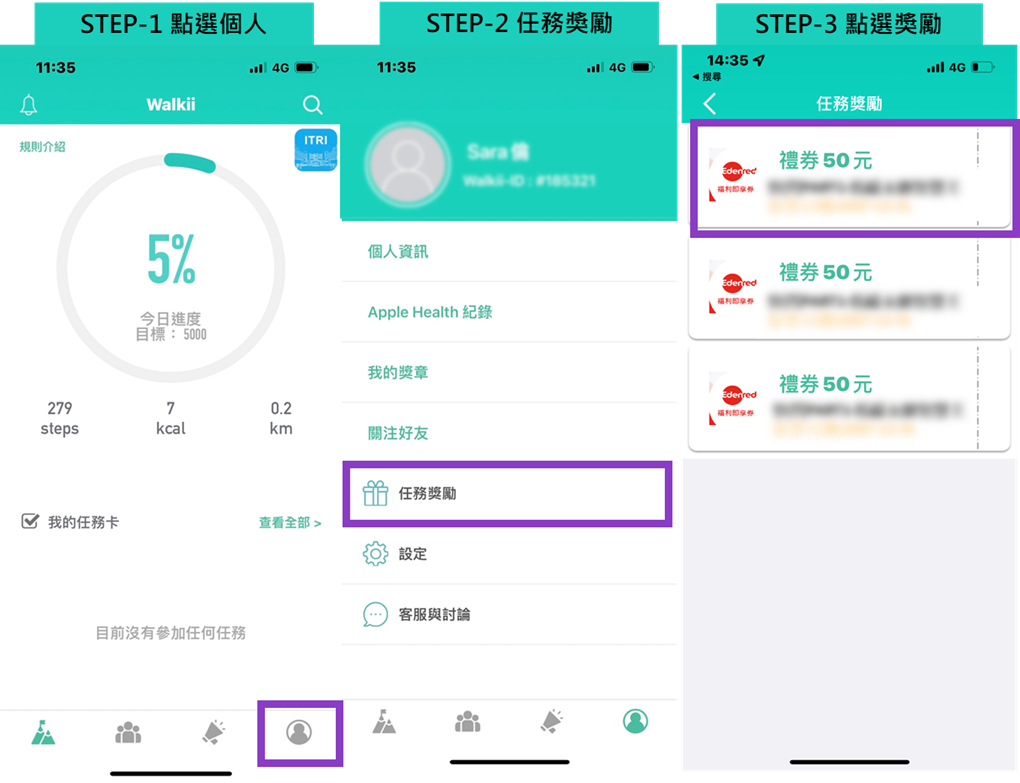
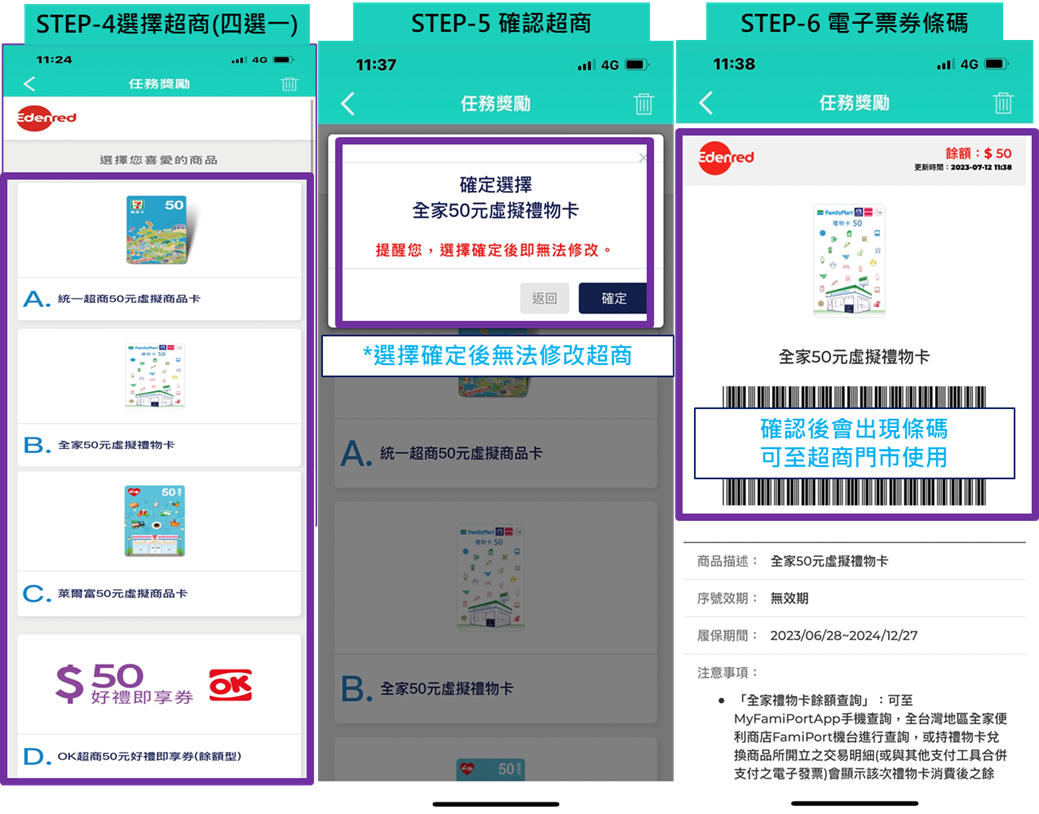
u注意事項:
1. 活動獎勵統一在活動結束後發放,發放時需為在職人員。
2. 電子票券由Walkii 官方發送,請至APP中領取,若已刪除APP且尚未綁定Mail 者,請洽walkii 客服恢復帳號以利領取獎勵。
3. 電子票券本身無期限(可截圖條碼留存),或請於APP保管期限內(2027-12-31)前使用完畢。
----------------------------------------------------------------------------------------------------------

🎲 ITRI JOIN 健走大富翁 開跑啦!🏃️🏃🏃️
還在想著要怎麼養成每天走路的好習慣嗎?
好消息來啦!
《ITRI JOIN 健走大富翁》健走活動即將熱鬧登場!
今年組隊模式強勢回歸,
邀請你揪上好夥伴,一起走出辦公室、動出好精神!
每天多走一點點,
為健康擲出你的小幸運🎲 🎲 🎲
一步一步,
為自己贏得滿滿的大健康 💪
活動時間
04/20-06/18(共60天)
活動對象
全院同仁
活動內容
📌個人健走組:
- 健康定存獎:活動期間,每日6000步,共累績42天(含)以上,即可獲獎。
- 健康大贏家:活動期間,走完ITRI大富翁地圖最多圈數前200名,抽50名。
📌團體組:2-5人/組 (自行組隊)
️
️🎖️活動獎勵️🎖️
- 健康定存獎:200元禮券/人
- 健康大贏家:100元禮券/人
- 健康合夥人獎:100元禮券/人
*4/24前可自行變換團隊(欲更換團隊可參考變更團隊步驟)
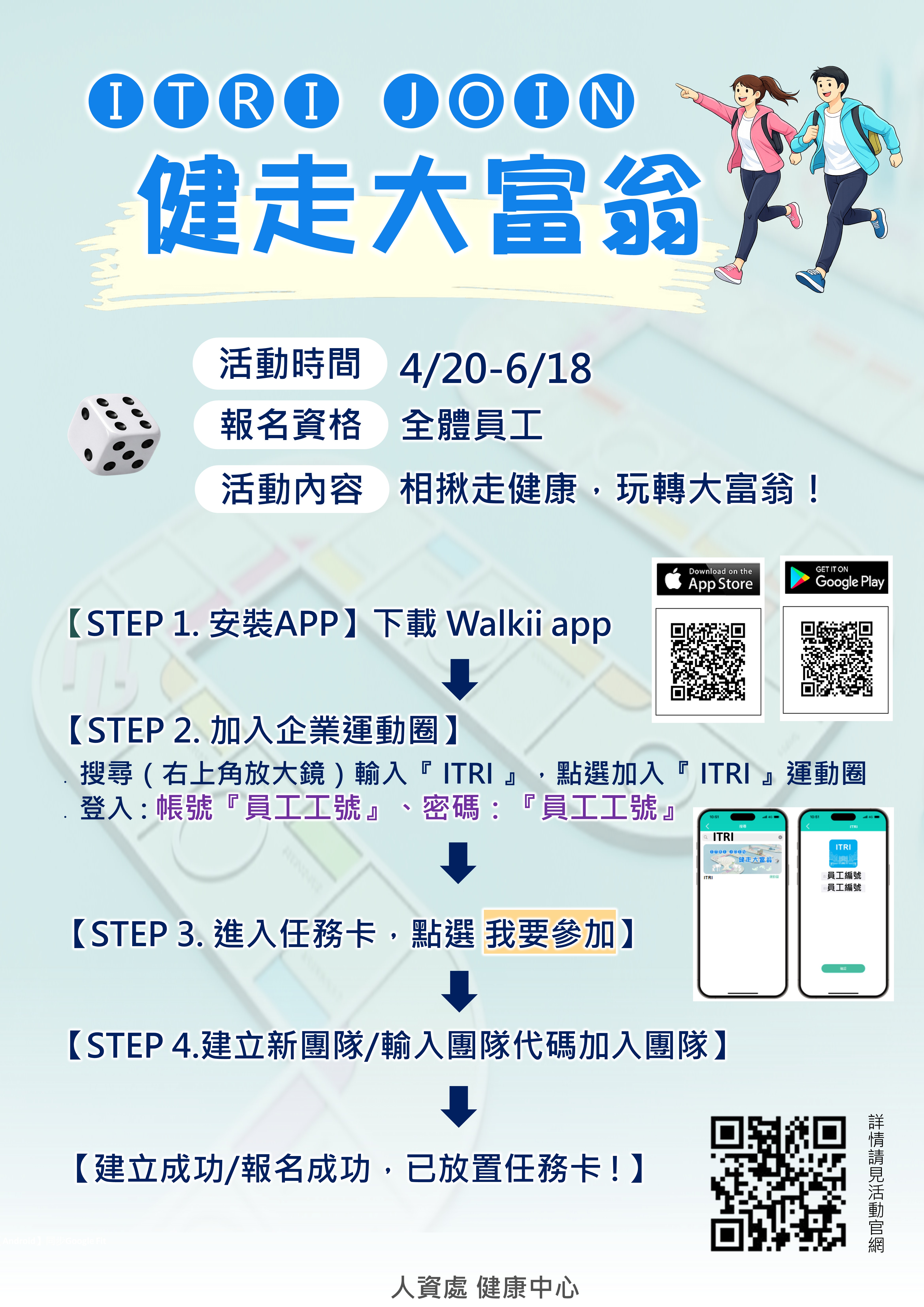
*若您只參加個人賽,請創建自己的隊伍名稱
Walkii APP 使用提醒
- 建議同仁在活動期間勿移除APP,以免造成重新載入資料遺失。如需重新安裝或更換手機,請先確認帳號有使用Email 綁定,更換後使用Email 登入APP即可。
- 參加本活動限定使用Walkii APP。
- 活動主辦單位會核對並保留所有修正紀錄的權利,如有異常數據將可不採計,主辦單位可取消活動資格,參加者不得異議。
【 健走任務 】注意事項
- 請開啟Apple Health(IOS)/Google Fit(Android)同步。
- 每日開啟APP點選任務卡內的『上傳數據』按鈕上傳當日數據。 如當日忘記上傳數據,可使用APP內的『數據補登』功能,七日內的紀錄皆可上傳。
- 最後補登日(6/19):活動結束後一天;請同仁在這天完成最後七天所有的數據上傳,超過即無法補登。
- Apple Health(IOS)/Google Fit(Android)內同時具有穿戴裝置與手機紀錄時,將會以紀錄較高的一方作為數據紀錄。
- Android手機用戶如配戴Garmin手錶,請於Walkii Garmin connect 頁面完成帳號同步。
系統客服
-系統軟體問題-
LINE專人客服協助您處理程式與系統問題
[email protected] 客服時間 週一至週五

----------------------------------------------------------------------------------------------------
🎲 ITRI JOIN Health Monopoly Walking Event 🏃♂️
Still looking for a way to build a daily walking habit?
Great news ! The ITRI JOIN Health Monopoly Walking Event is here!
This year, the team mode is back,
inviting you to team up with colleagues, get out of the office, and boost your energy together!
Walk a little more every day,
and roll your way toward better health 🎲🎲🎲
Step by step,
earn your own “big health reward” 💪
📅Event Period
April 20 – June 18 (60 days)
🧍♂️Participants
All ITRI employees
Event Details
📌 Individual Category
1️⃣ Health Savings Award
Walk 6,000 steps per day and achieve this goal for at least 42 days.
🎁 Reward: NT$200 voucher per person
2️⃣ Health Champion Award
Rank among the top 200 in total Monopoly map rounds walked. 50 winners will be selected by draw.
🎁 Reward: NT$100 voucher per person
📌 Team Category (2–5 members per team)
Health Partnership Award: Based on total team step count Top 50 teams
🎁 Reward: NT$100 voucher per person
*You may change your team before April 24.
*After April 24, please confirm your team code before joining
👉 For English Participation Process, please click here
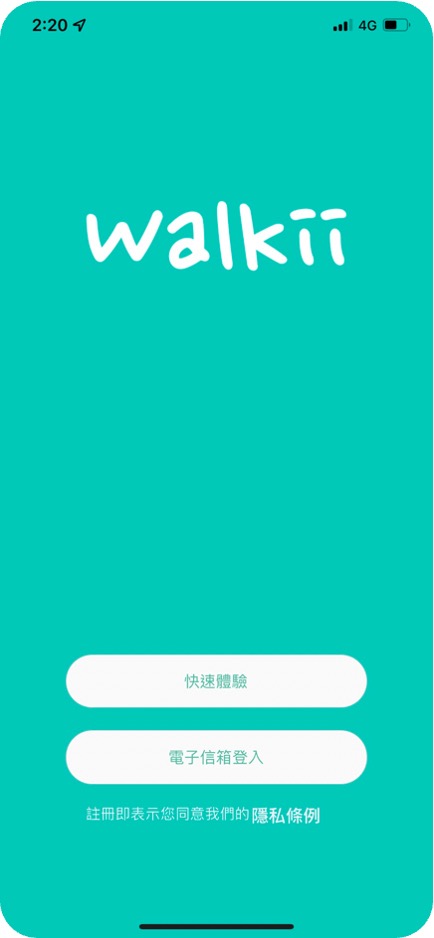
【STEP 1. 安裝APP】
- 下載 Walkii app。(請確認更新到最新版本)

- 選擇一種『註冊方式』完成帳號登入
- 快速體驗:限制單次使用,移除APP或更換手機將『無法回復資料』
- 電子信箱登入:綁定您的電子信箱,可透過電子信箱回復帳號資料
【STEP 2. 同步手機資料】
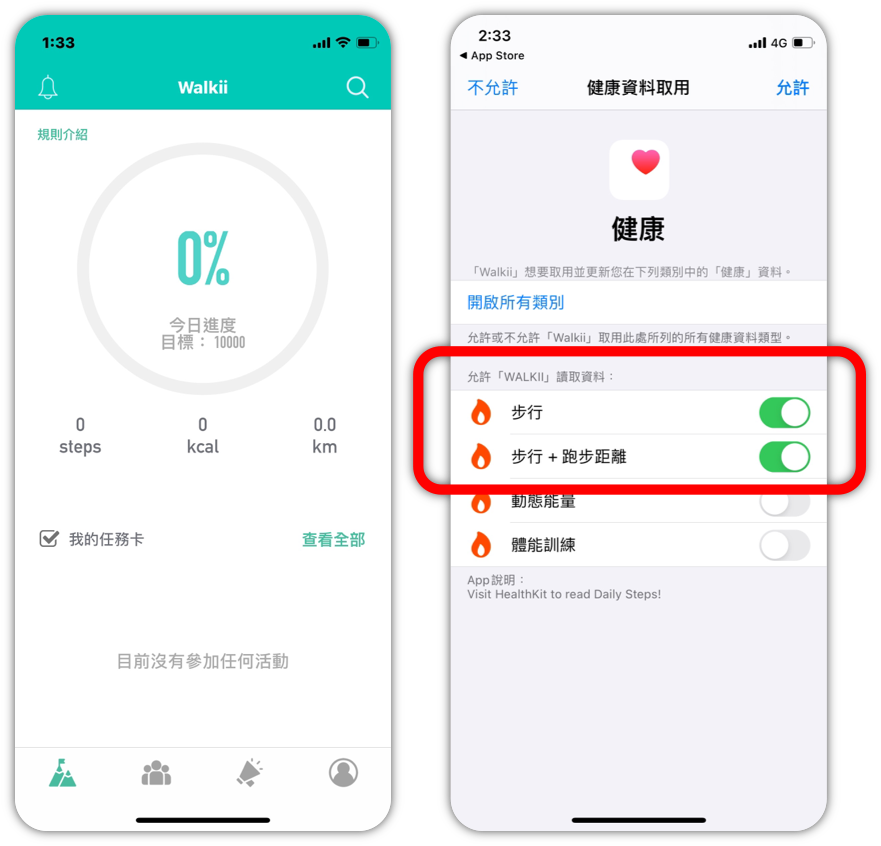
【iOS】同步Apple Health
-
初次登入會跳出同步選項,點選『步行』,然後點選「允許」即可完成同步
- 如果錯過設定,您還可以按以下步驟:
在蘋果手機點選『設定』→ 隱私權→健康→Walkii,確認是否開啟『步行』
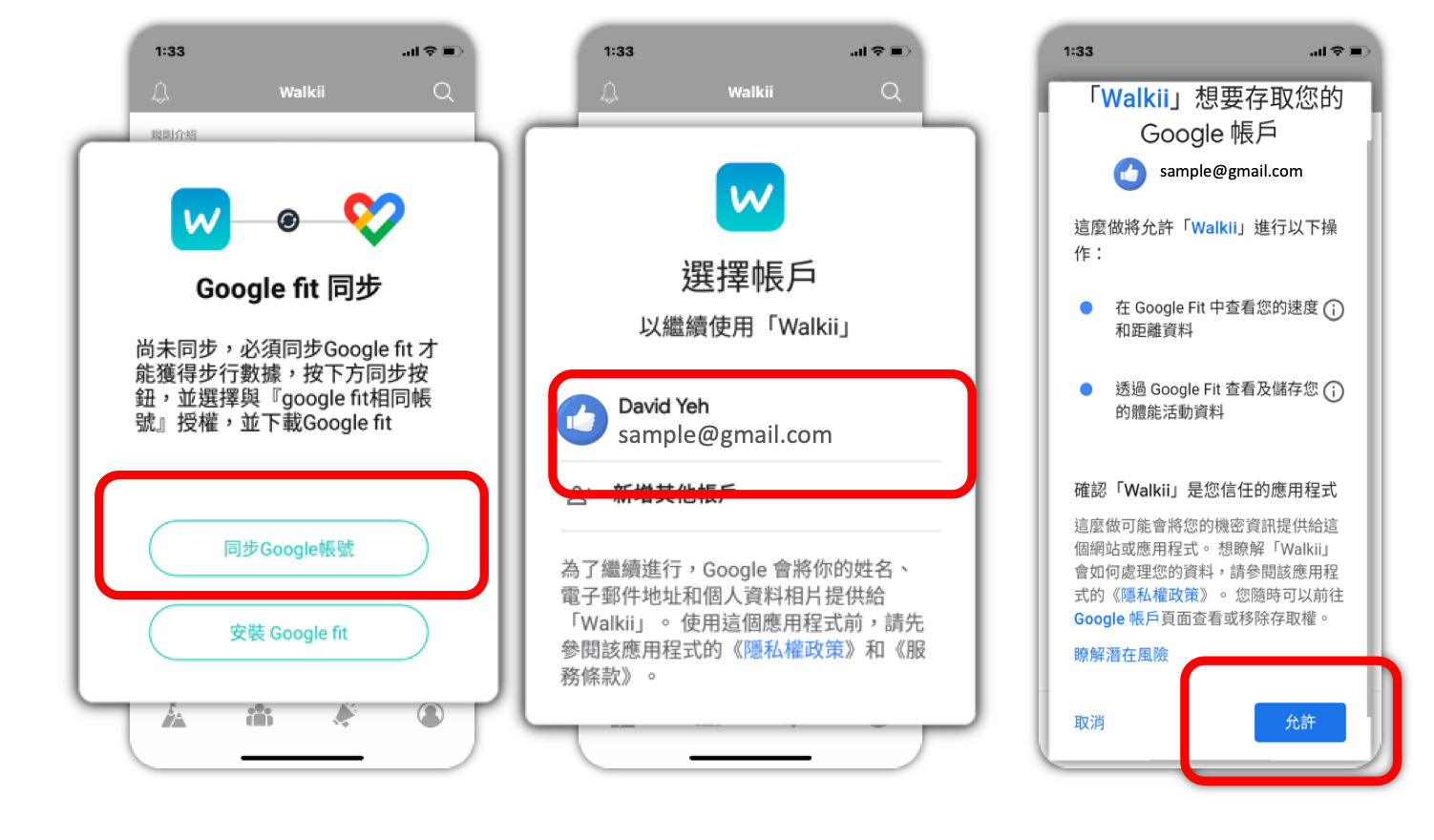
【Android】同步Google Fit
-
初次登入時同步Google 帳號授權,即可透過Google Fit 取得當日步數(若無Google Fit App需先下載):
同步Google 帳號 → 選擇Google Fit連動的『帳號』→『允許』
- 若不確定是否同步正確,您還可以按以下步驟:
個人資料 → 設定 → 管理已連結應用程式,確認是否有 Walkii
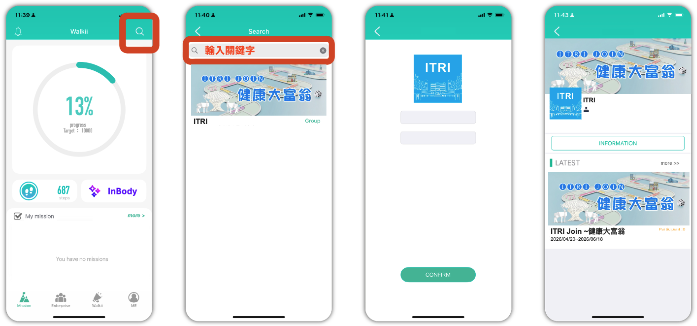
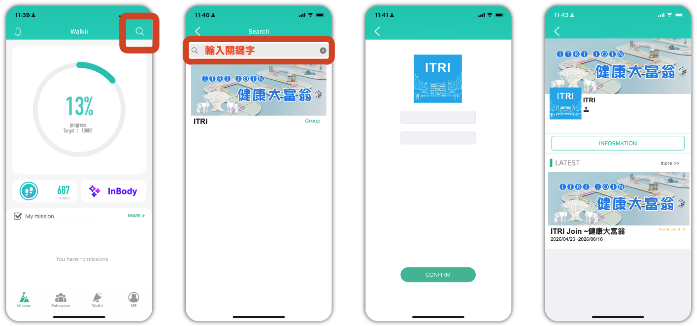
【STEP 3. 加入企業運動圈】
-
點選搜尋(右上角放大鏡),輸入『 ITRI 』,點選加入『 ITRI 』運動圈
-
登入資訊:
帳號:『員工工號』。
密碼:『員工工號』。
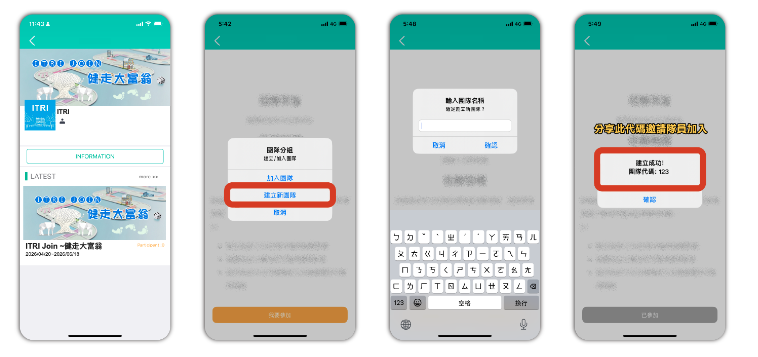
【STEP 4.1創建隊伍】
- 點入『ITRI Join ~健走大富翁』任務卡,點選『我要參加』
- 創建隊伍(*若您只參加個人賽,請創建自己的隊伍名稱)
- 輸入隊伍名稱
- 取得團隊代碼
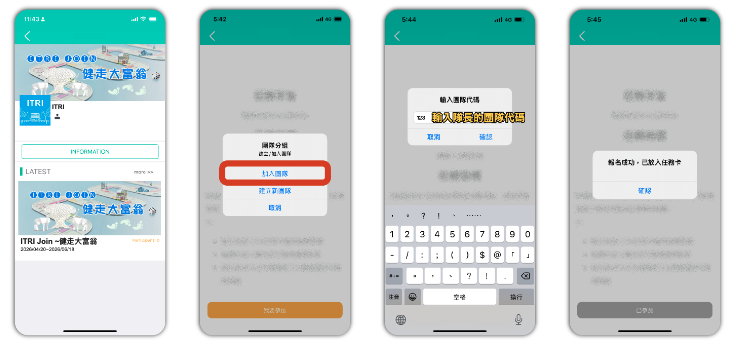
【STEP 4.1加入朋友的隊伍】
ITRI Join ~健走大富翁
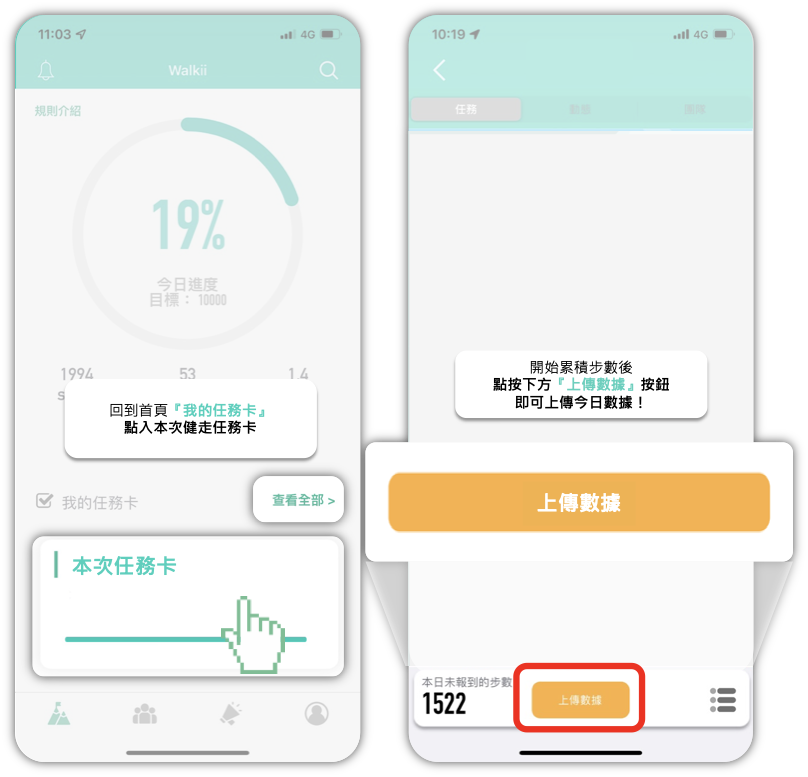
【STEP 1. 上傳數據】
- 回到首頁,點入任務卡『 ITRI Join ~健走大富翁』
- 點選『上傳數據』上傳當日數據
- 建議每日睡前打開 app 一次同步當日累積步數
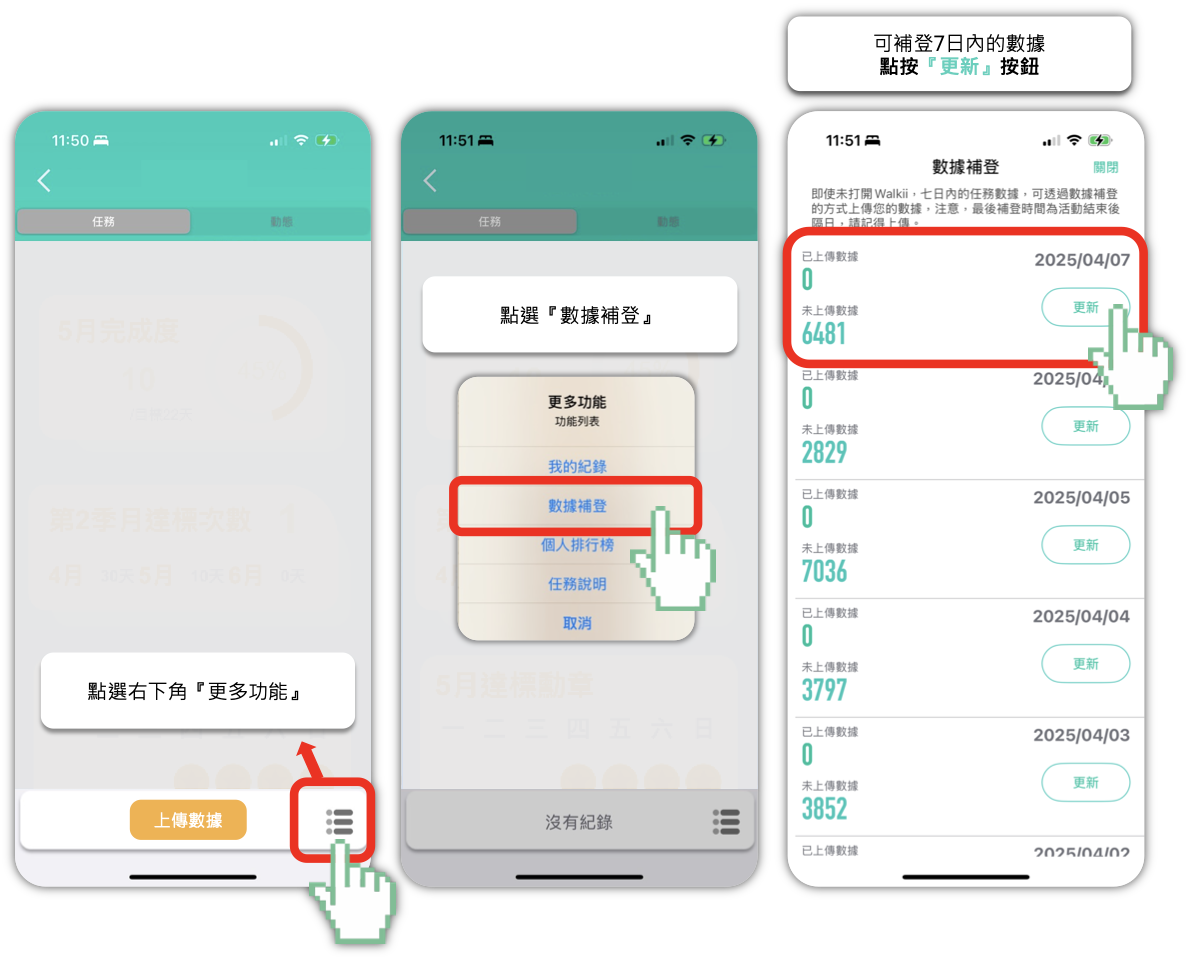
【STEP 2. 步數數據7日內補登】
-
如當日忘記打開 app 同步紀錄,可使用 app 7日內『數據補登』功能手動上傳您的紀錄
- 點入任務卡畫面右下角圖示,點選『數據補登』上傳七日內的步數數據
(如需使用補登功能,需先上傳一筆數據→進入任務卡後,點按「上傳數據」)
-------------------------------------------------------------------------------------------------------
搶先通知!!!
任務1-健康起跑點~InBody一量就上線
至健檢現場自行量測InBody1次,完成者即可抽獎!
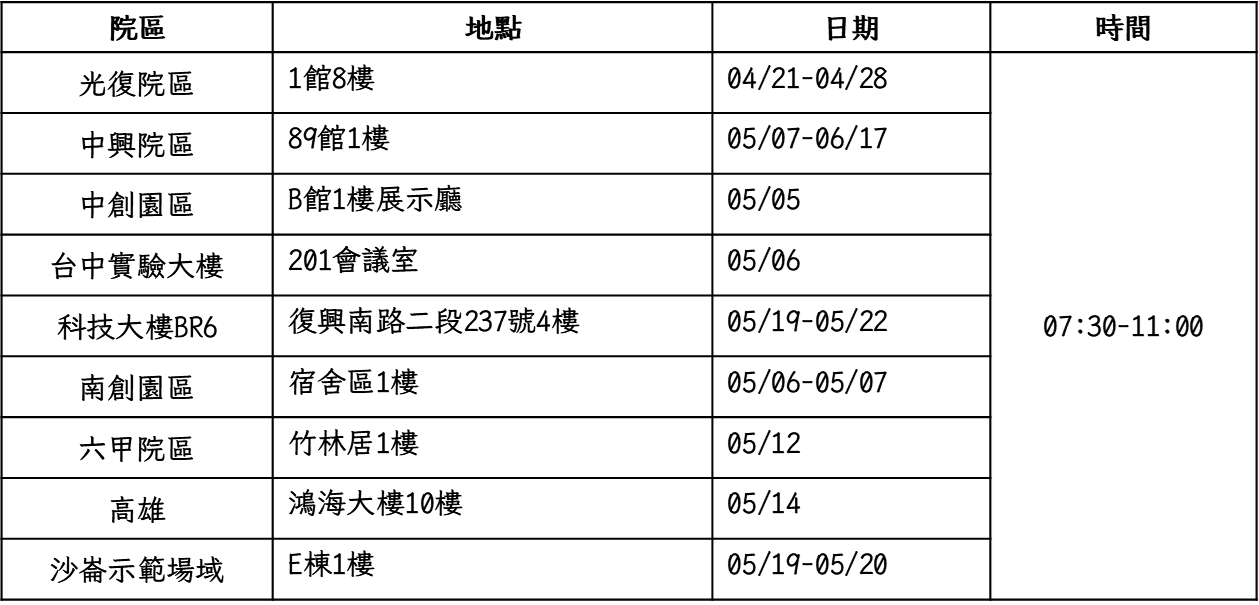
*上述日期內皆可量測,完成1次即符合抽獎資格。
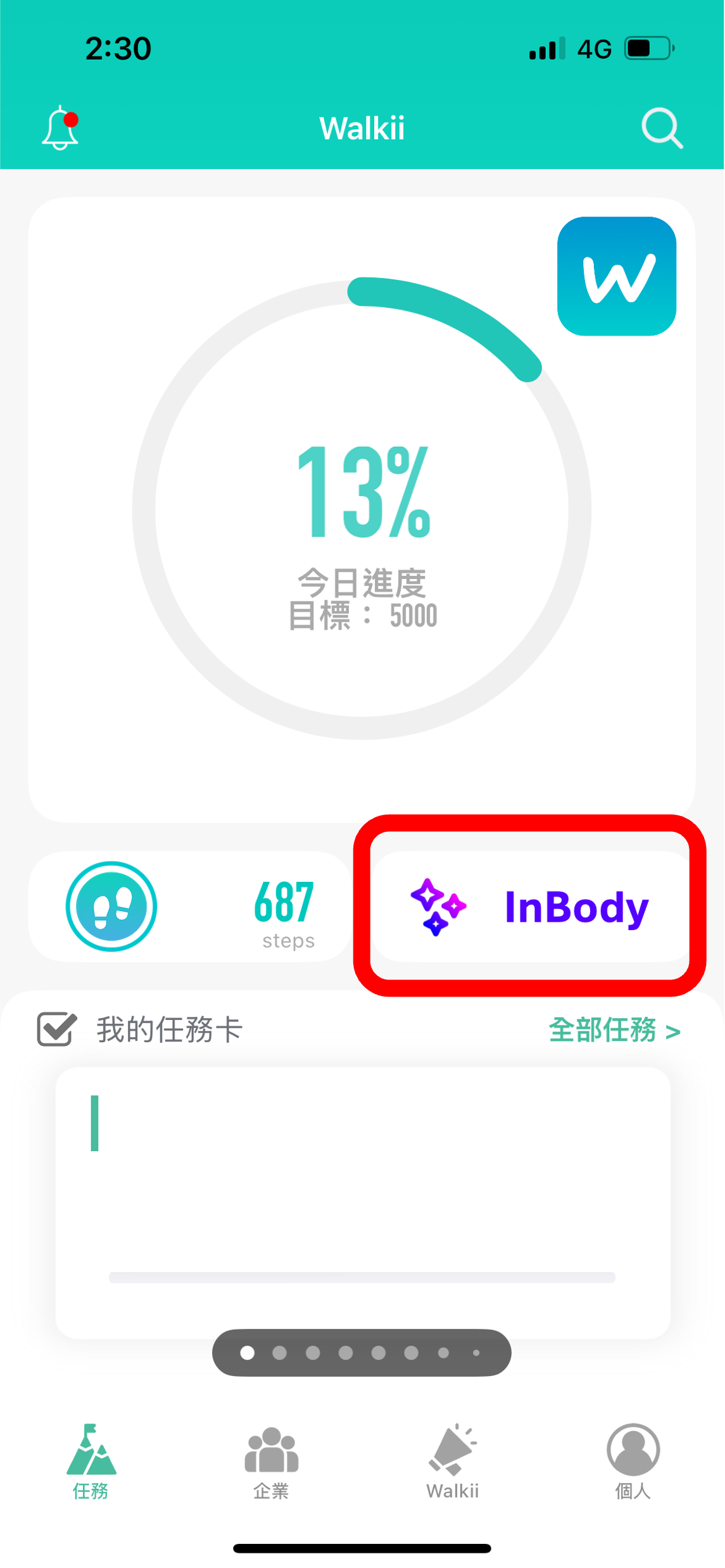
【STEP 1. 打開InBody任務卡】
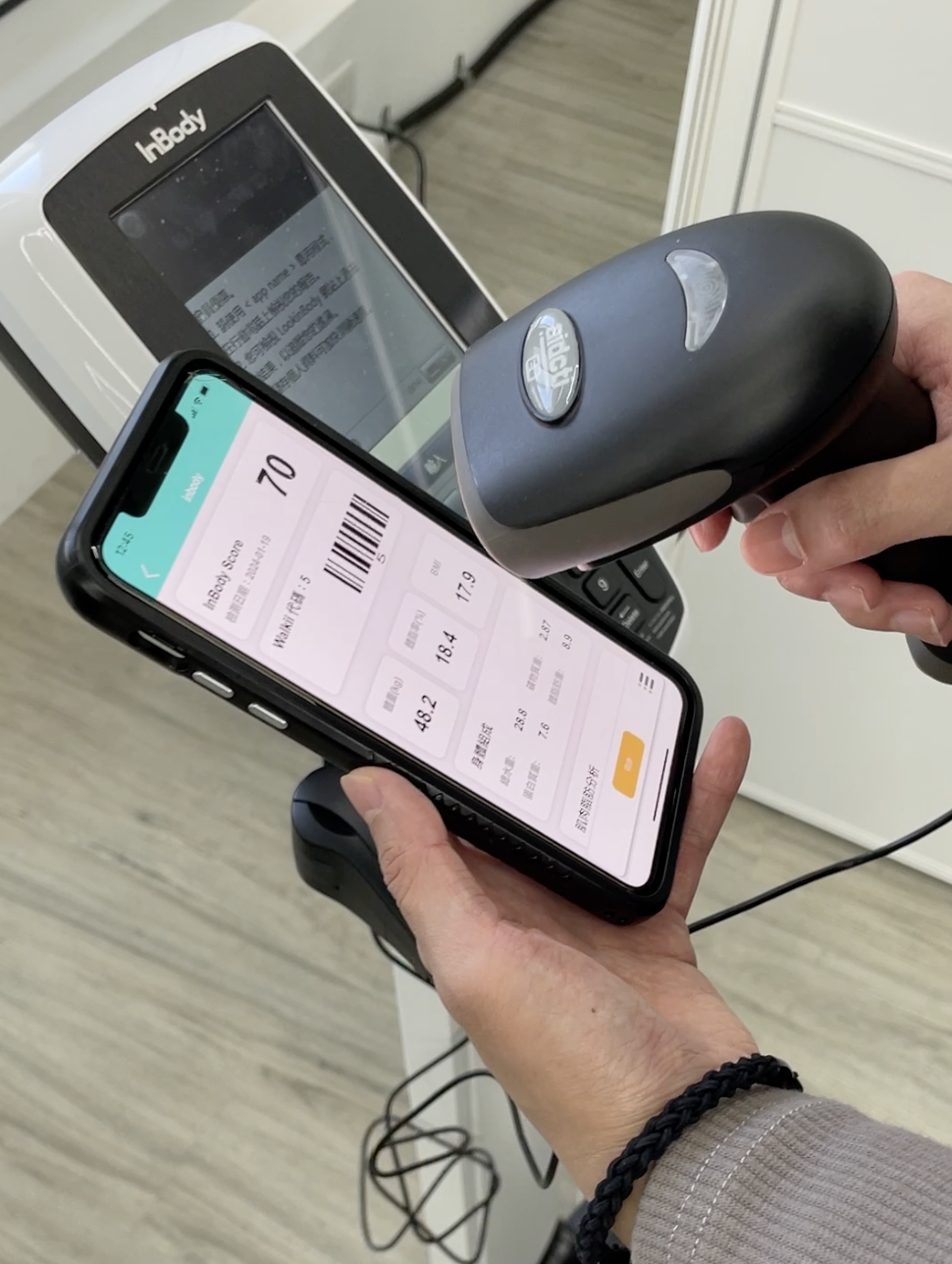
【STEP 2. 使用掃碼機掃碼條碼】
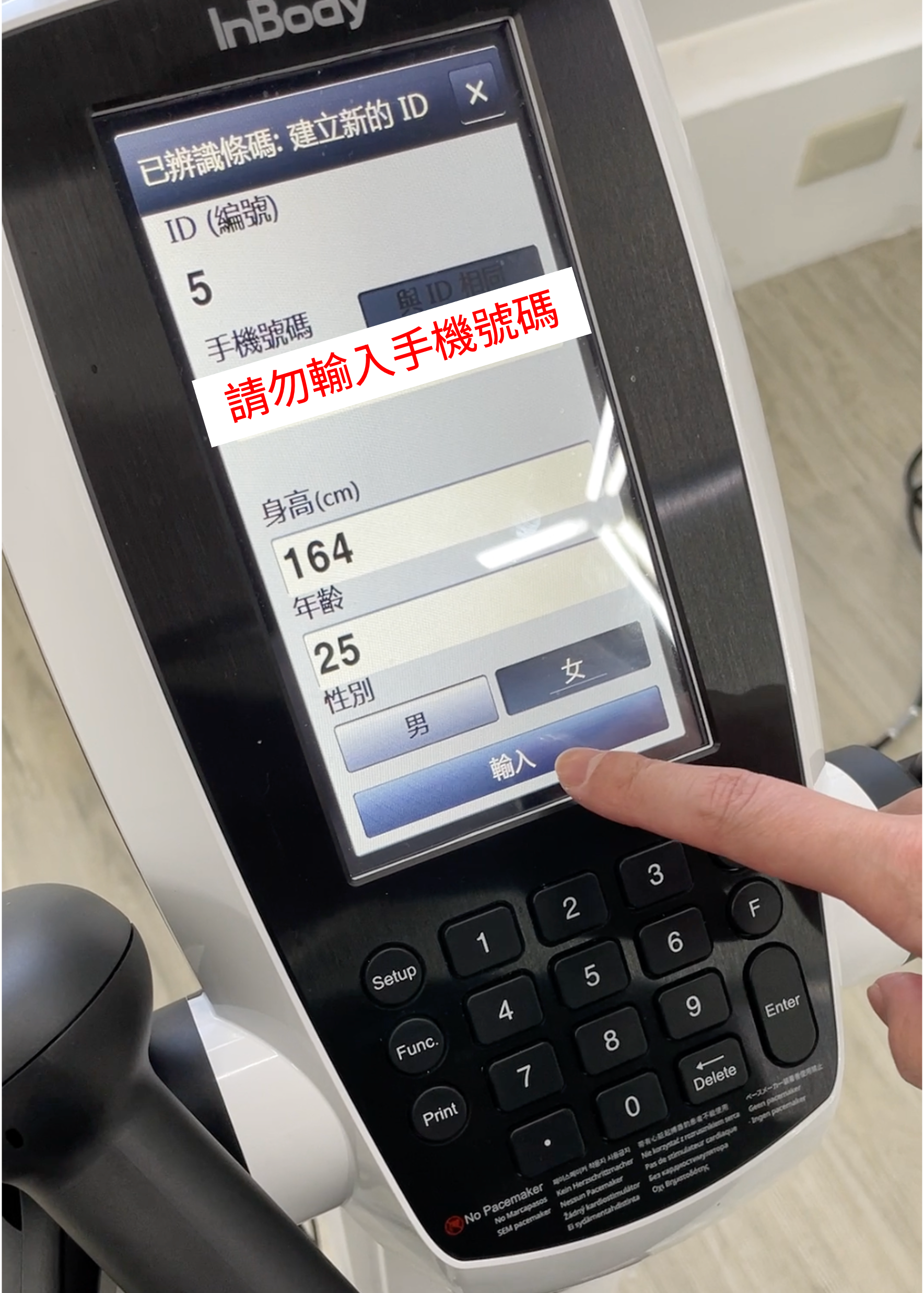
【STEP 3. 確認個人資訊】
- 於InBody上確認個人資訊是否正確
- 請勿輸入手機號碼
- 確認後,點按『輸入』按鈕
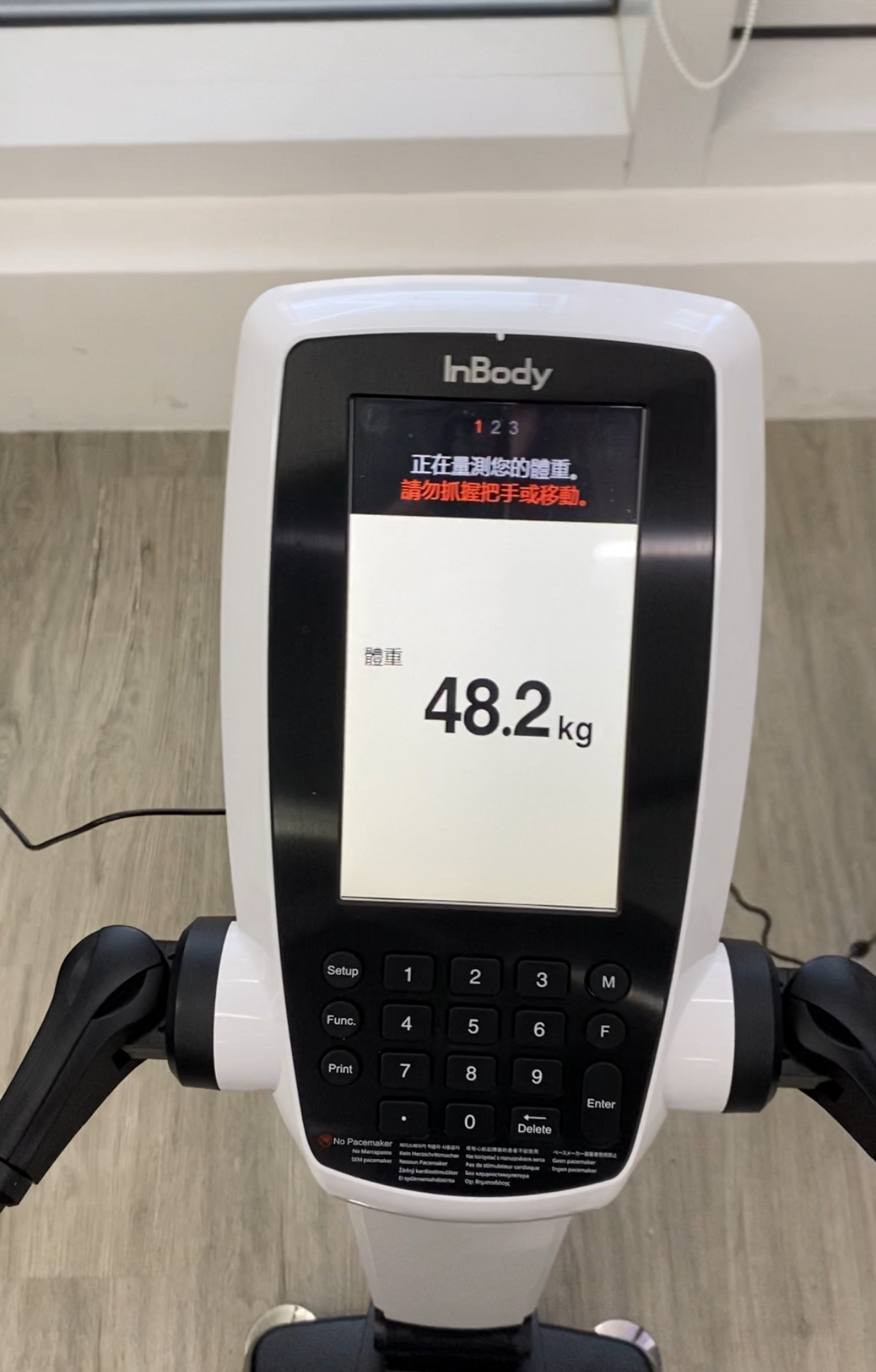
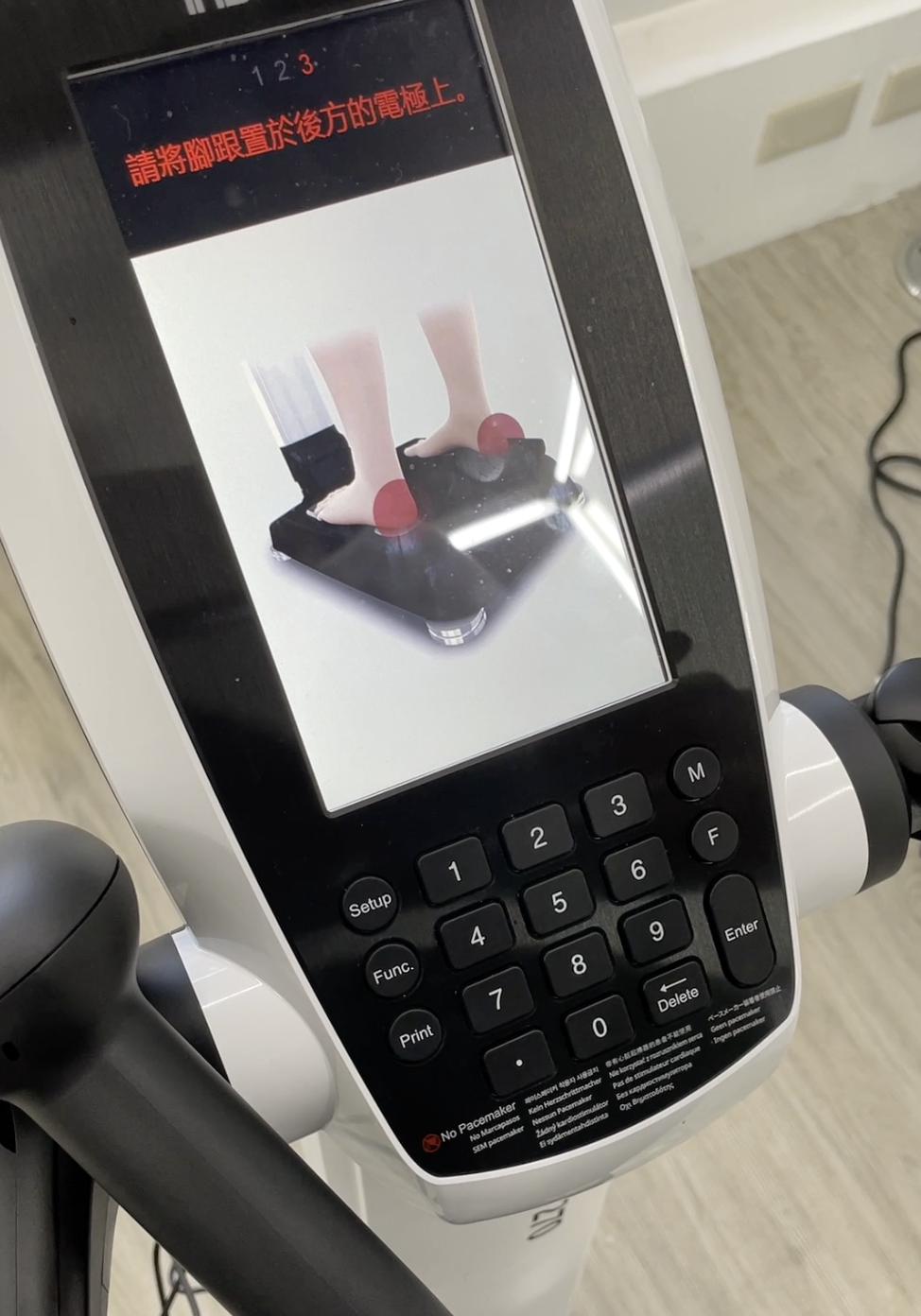
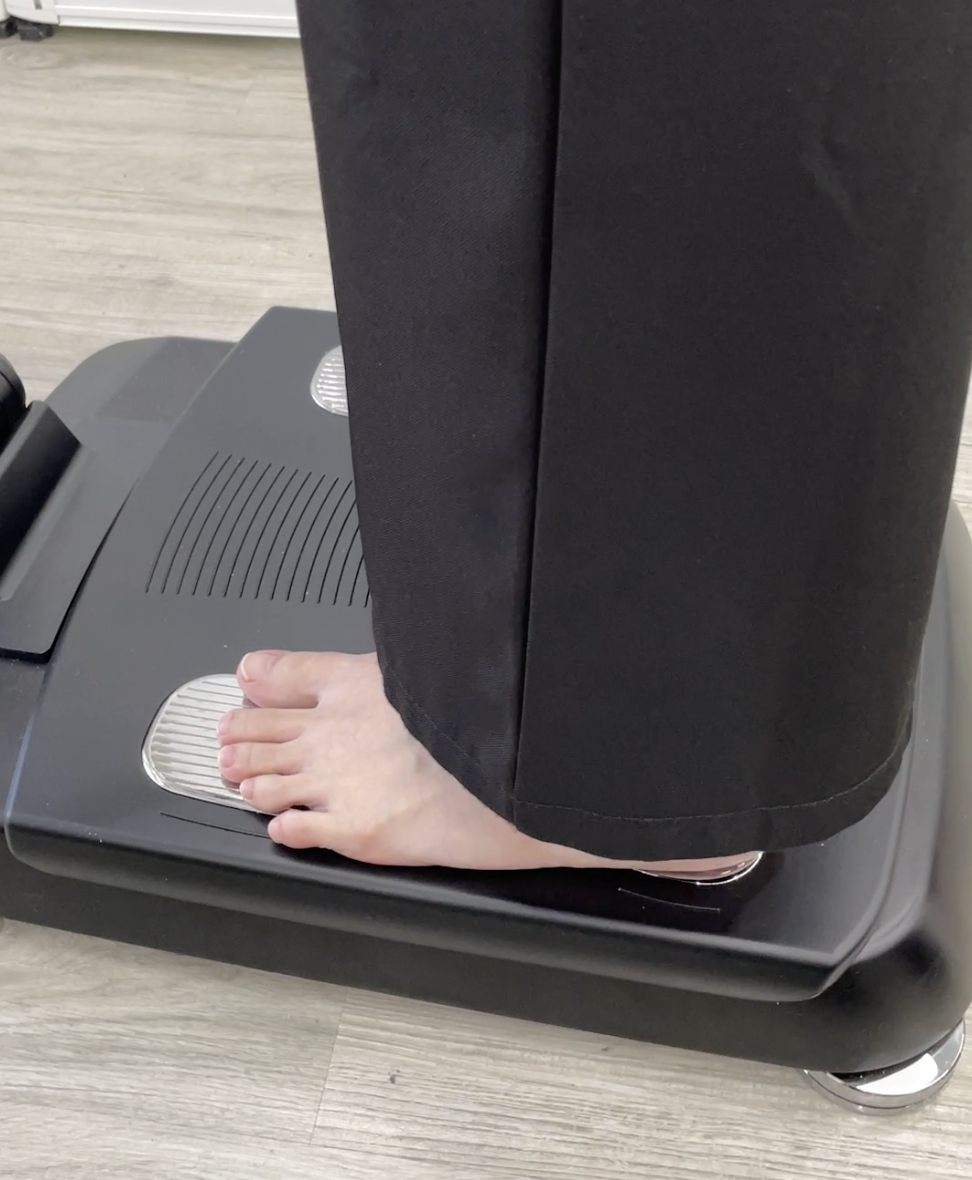
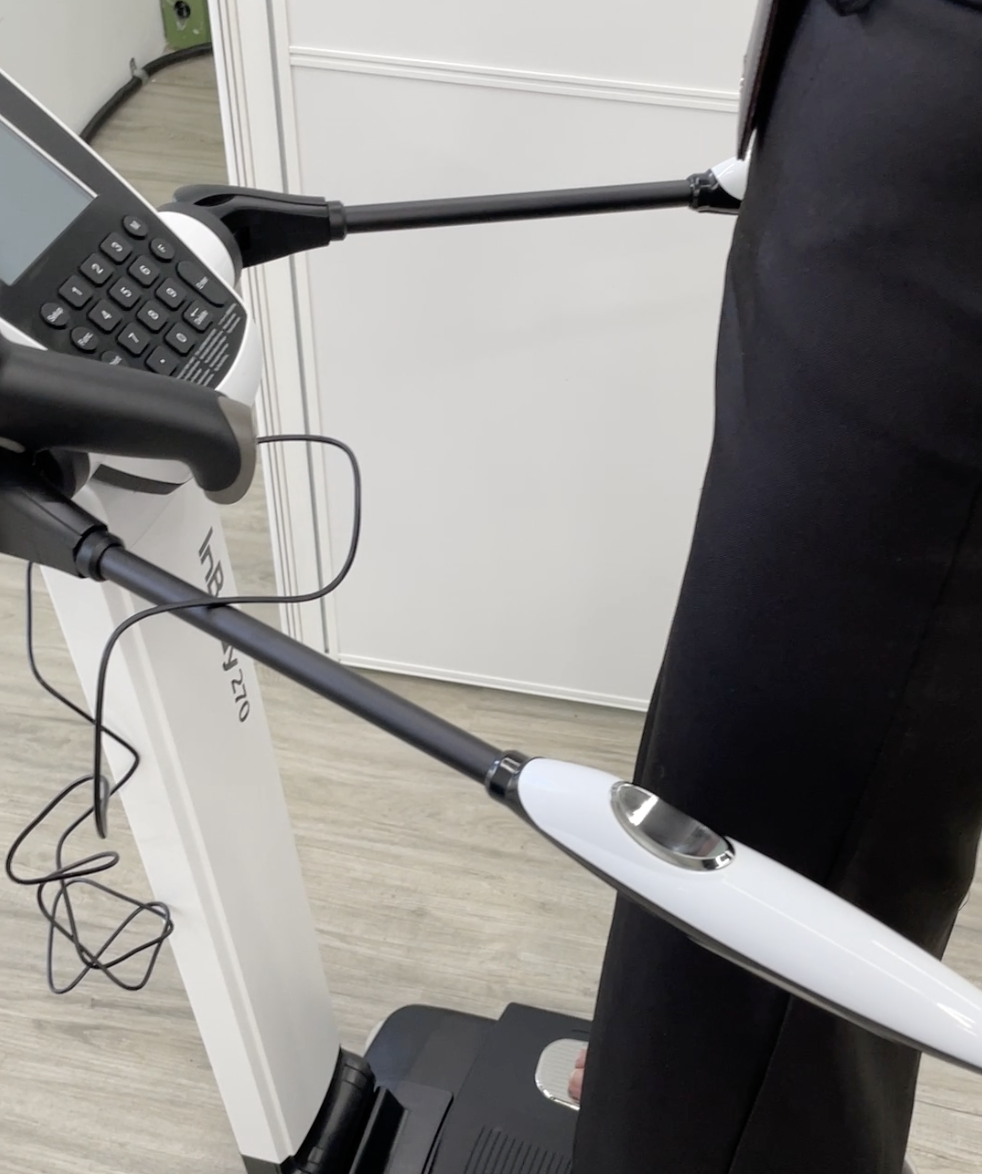
【STEP 4. 量測準備】
請根據InBody的引導,完成量測
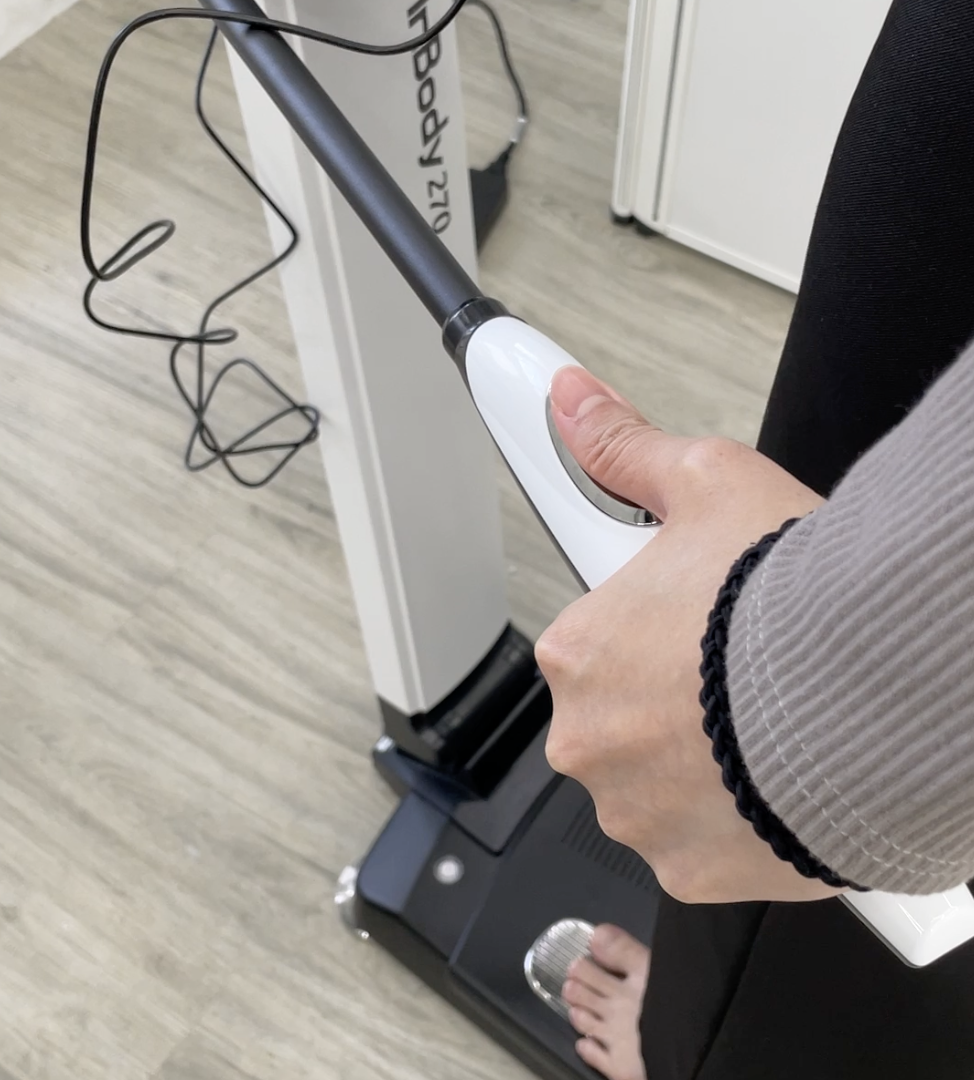
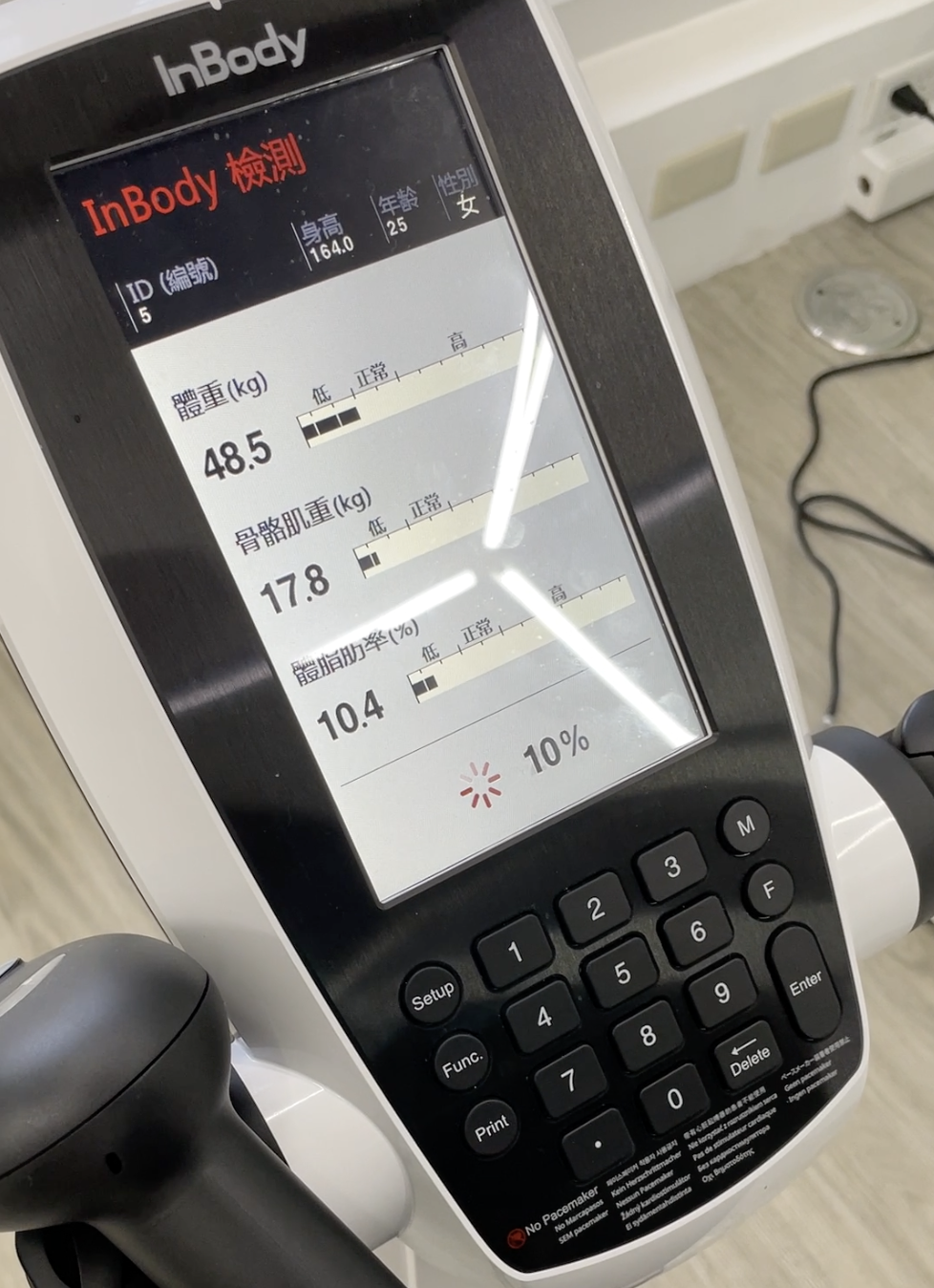
【STEP 5. 開始量測】
請根據InBody的引導,完成量測
- 保持手臂伸直,雙臂不要觸及身體兩側
- InBody 檢測中
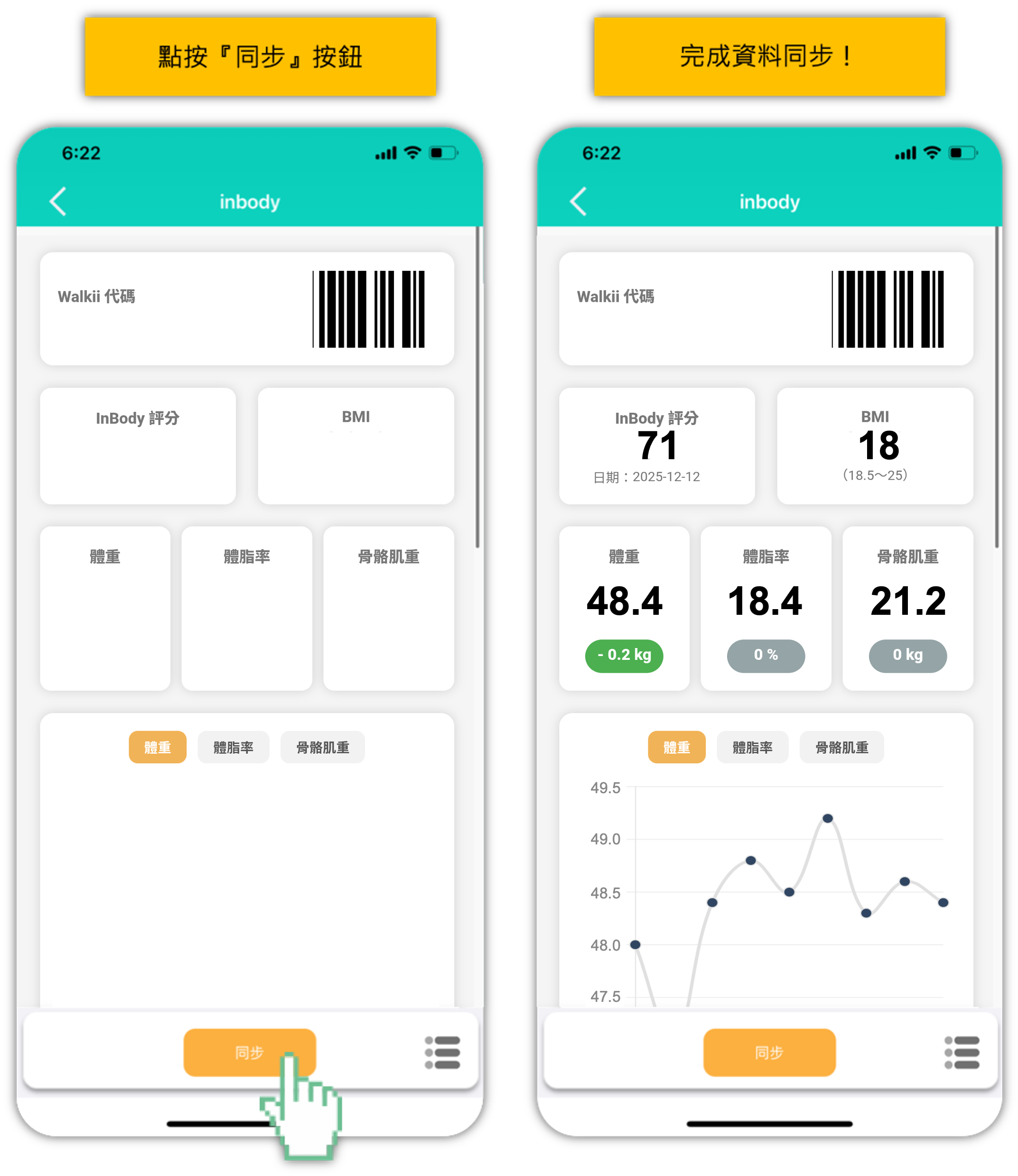
【STEP 6. 完成量測 同步Walkii】
- 量測完成
- 回到Walkii APP,點按『同步』按鈕
- 完成資料同步!
--------------------------------------------------------------------------------------------------------
【STEP 1. Install the APP】
Download the Walkii app. (Make sure it is updated to the latest version)
Choose one of the ways below to sign up an account.
-
Quick Experience: The data will be removed if you delete APP or use another device.
-
Email Login: Connect with your Email, and you can restore your account.
【STEP 2. Sync Mobile Data】
【iOS】Sync with Apple Health
【Android】Sync with Google Fit
-
When logging in for the first time, authorize your Google account to sync step count from Google Fit (If Google Fit is not installed, please download it first).
-
Sync with Google account
-
Select the Google account linked to Google Fit
-
Tap "Allow"
-
If you're unsure whether the sync is set up correctly, check:
Go to Profile → Settings → Manage linked apps, and confirm Walkii is listed.
【STEP 3. Join the Corporate Fitness Group】
- Search『ITRI』and join『ITRI』Group
Login Information:
-
Account: Employee ID
-
Password: Employee ID
【STEP 4.1 Create a team】
- Click on the “ITRI Join ~ Walking Monopoly” mission card and select “Join Now.”
- Create a team (if you are only joining the individual competition, please create your own team name).
- Enter the team name.
- Obtain the team code.
【STEP 4.1 Join a team】
- Join a team
- Select “Join Team”
- Enter the team code
ITRI Join ~健走大富翁(ITRI Join ~ Step Into Health Monopoly)
【STEP 1. Upload Your Data】
*Tip: Open the app once before bedtime daily to sync your step count.
【STEP 2. Forget to update daily record, Upload Data within 7 Days】
- If you forget to update the your daily record, you can upload the past 7 days data on the 『Data Registration』page.
-
Go to the mission , Clicking the『Data Registration』to update your past 7 days data.
InBody Measurement
Take one InBody measurement at the health examination venue
and get a chance to win a prize!
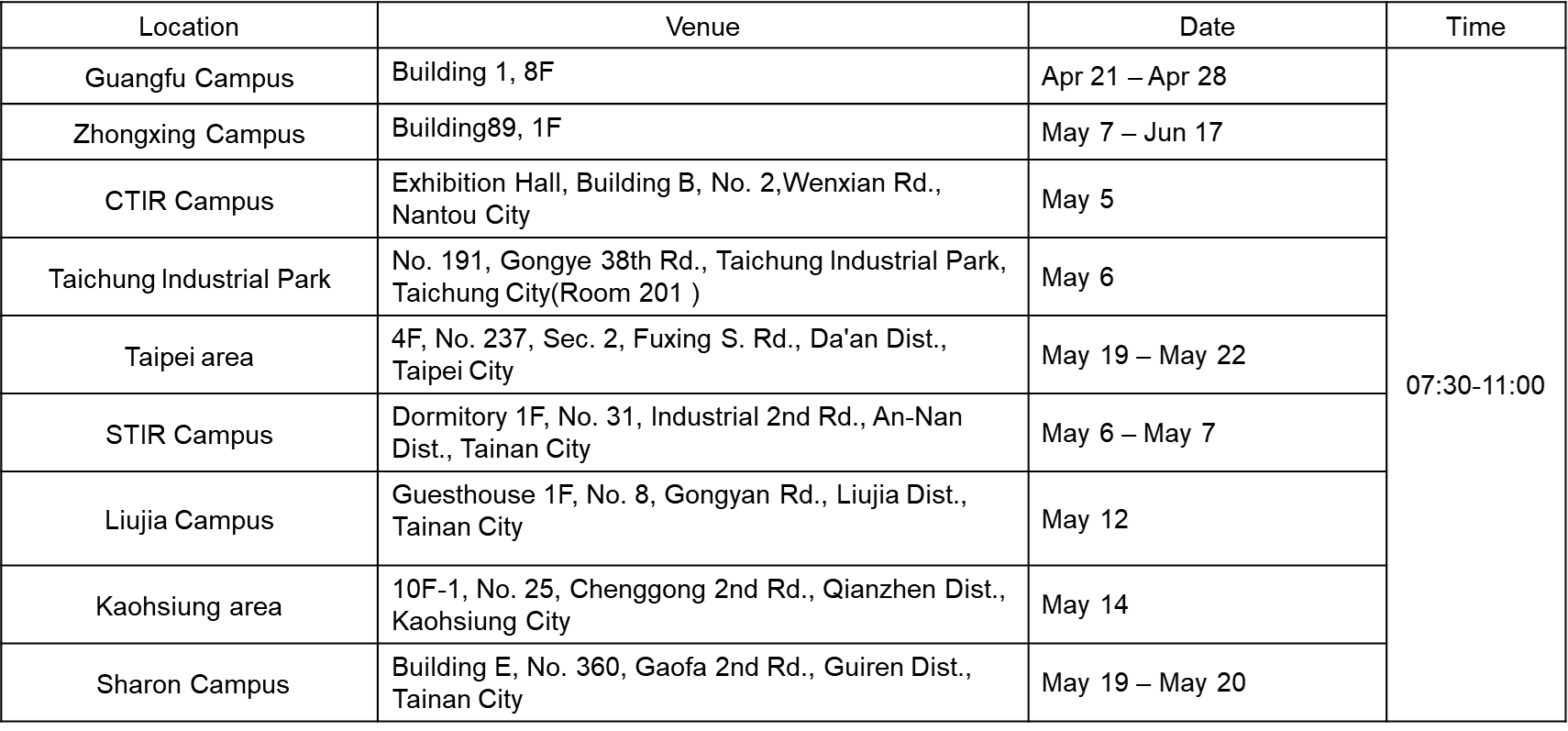
【STEP 1. Open InBody Card】
- On the homepage, enter the "InBody" Mission Card.
【STEP 2. Scan Barcode】
- Use the InBody machine's scanner to scan your personal barcode in the app.
【STEP 3. Confirm Info】
- Confirm your personal info on the InBody screen.
- DO NOT enter your phone number.
- Click "Enter" after confirmation.
【STEP 4. Preparation】
Follow the InBody guidance.
- Measuring weight (Do not hold handles or move).
- Place heels on the rear electrodes.
- Hold handles and place thumbs on the grooves.
【STEP 5. Measurement】
Follow the InBody guidance.
- Keep arms straight and away from your body.
- InBody testing in progress...
【STEP 6. Finish & Sync】
- Measurement complete.
- Return to the Walkii App and click "Sync."
- Data synchronization finished!
注意事項
- 建議同仁在活動期間勿移除APP,以免造成重新載入資料遺失。如需重新安裝或更換手機,請先確認帳號有使用Email 綁定,更換後使用Email 登入APP即可。
- 參加本活動限定使用Walkii APP。 並請開啟Apple Health(IOS)/Google Fit(Android)同步。
- 每日開啟APP點選任務卡內的『上傳數據』按鈕上傳當日數據。 如當日忘記上傳數據,可使用APP內的『數據補登』功能,七日內的紀錄皆可上傳。
- 最後補登日(6/19):活動結束後一天;請同仁在這天完成最後所有的數據上傳。
- Apple Health(IOS)/Google Fit(Android)內同時具有穿戴裝置與手機紀錄時,將會以記錄較高的一方作為數據紀錄,手動輸入數據不予記錄。
-
Android手機用戶如配戴Garmin手錶,請於Walkii Garmin connect 頁面完成帳號同步;另Garmin 數據限當日完成同步,不支援七日補登功能,如需使用補登功能,請同步Google Fit。
- 活動主辦單位會核對並保留所有修正紀錄的權利,如有異常數據將可不採計,主辦單位可取消活動資格,參加者不得異議。
-
活動數據請「誠信紀錄」,主辦單位具查核及修正異常數據的權利,參加者不得異議。
如有未盡事宜,主辦單位得隨時修訂並公告於活動網站。
----------------------------------------------------------------------
Important Notices
-
It is recommended that participants do not uninstall the APP during the event to prevent data loss. If you need to reinstall or switch to a new phone, please ensure that your account is linked to an email. After switching, log in to the APP using your email.
-
Participation in this event requires the use of the Walkii APP. Please enable Apple Health (iOS) / Google Fit (Android) synchronization.
-
Open the APP daily and tap the “Upload Data” button within the task card to submit your daily data. If you forget to upload your data on the same day, you can use the “Data Entry” feature in the APP, which allows data uploads within seven days.
-
Final Data Entry Deadline(6/19): One day after the event ends. Please ensure all data uploads are completed by this date.
-
If both a wearable device and a mobile phone record data in Apple Health (iOS) / Google Fit (Android), the higher value will be recorded. Manually entered data will not be counted.
-
For Android users with a Garmin watch: Please complete account synchronization on the Walkii Garmin Connect page. Garmin data must be synced on the same day and does not support seven-day data entry. If you need to enter past data, please sync with Google Fit.
-
The event organizer reserves the right to verify and amend any recorded data. Any abnormal data may be disregarded, and the organizer has the right to disqualify participants if necessary. Participants may not contest these decisions.
-
"Honest" Data Recording: Participants should record data truthfully. The organizer has the right to review and adjust abnormal data, and participants may not contest these decisions.
-
Any unaddressed matters may be amended and announced on the event website at any time.
系統客服
-系統軟體問題-
LINE專人客服協助您處理程式與系統問題
[email protected] 客服時間 週一至週五