
任務宗旨 Task objectives
促進健康永續生活,從健走出發。走路有助於促進血液循環,增加肌肉強度,提升健康並減碳排放。本活動利用Walkii 健走APP,透過步伐換取實際種樹量,共同打造健康森林,響應減碳,為健康和地球種下希望!
趕快加入吧!
一起健走為健康、為地球帶來改變!
Promote a Healthy and Sustainable Lifestyle – Start with Walking!
Walking helps improve blood circulation, increase muscle strength, enhance overall health, and reduce carbon emissions. This event utilizes the Walkii Walking App, where every step you take contributes to actual tree planting. Together, we can create a thriving forest, support carbon reduction, and plant hope for both our health and the planet!
Join us now!
Let’s walk together and make a difference—for our health and for the Earth!
任務時間 Task Period
2025/3/3-2025/4/2
任務目標 Task goal
當全體累積1,000點即可種下1棵樹!🌱
Once the team accumulates 1,000 points, a tree will be planted! 🌱
【STEP 1. 安裝APP】
- 下載 Walkii app。(請確認更新到最新版本)
【STEP 1. Download APP】
- Download Walkii app, and make sure it's the latest version.


- 選擇一種『註冊方式』完成帳號登入
- 快速體驗:限制單次使用,移除APP或更換手機將『無法回復資料』
- 電子信箱登入:綁定您的電子信箱,可透過電子信箱回復帳號資料
-
Choose one of the ways below to sign up an account.
- Just Test: The data will be removed if you delete APP or use another device.
- E-mail Login: Connect with your Email, and you can restore your account.
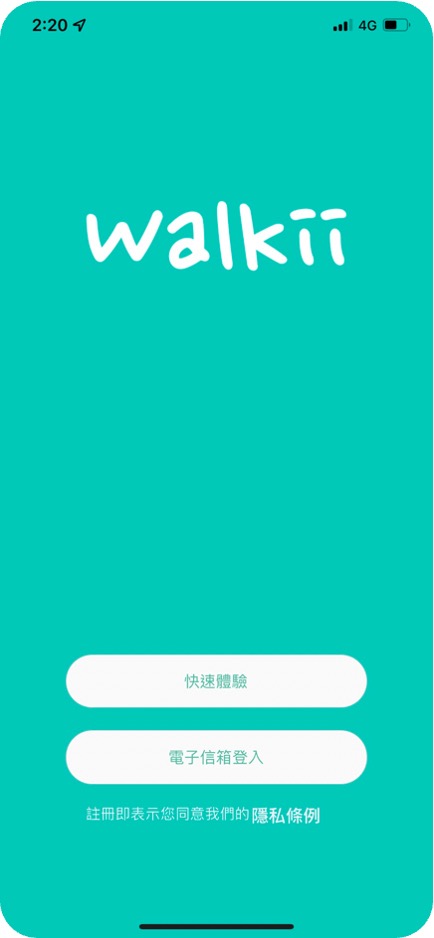
【STEP 2. 同步手機資料】
【iOS】同步Apple Health
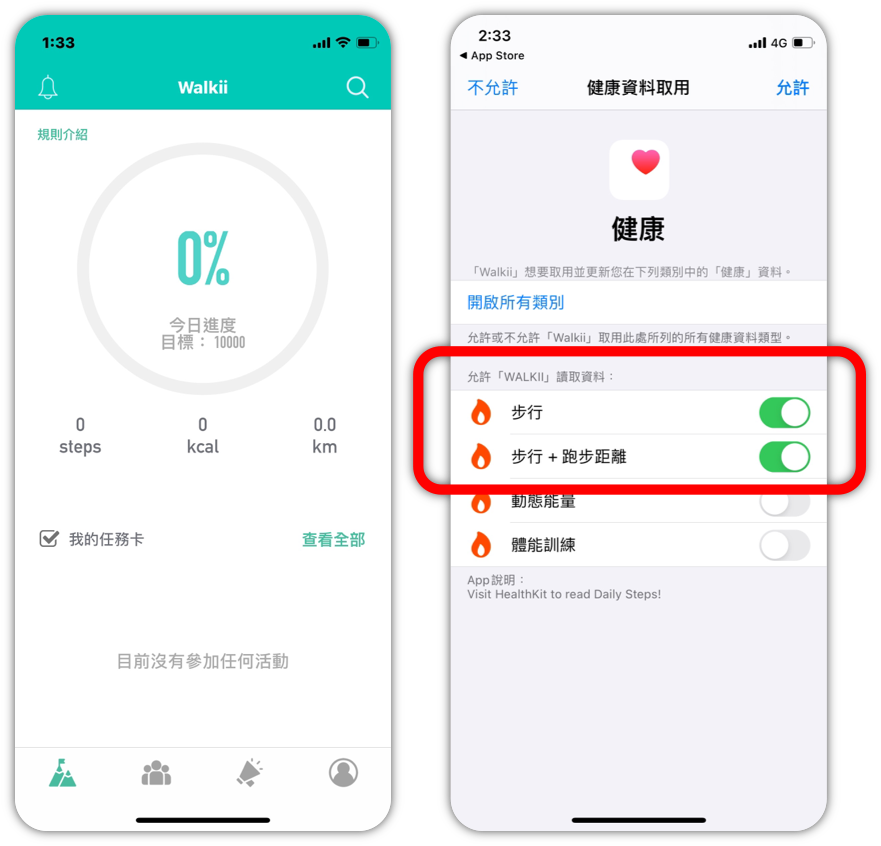
- 初次登入會跳出同步選項,點選『步行』,然後點選「允許」即可完成同步
- 如果錯過設定,您還可以按以下步驟:
在蘋果手機點選『設定』→ 隱私權→健康→Walkii,確認是否開啟『步行』
【STEP2. Allow Walkii to access data from your phone.】
【iOS】Sync. Apple health
- Allow Walkii to read data from Apple health.
- Turn on Auto-Sync.: Settings -> Privacy -> Health -> Walkii, and turn on“Steps”
【Android】同步Google Fit
-
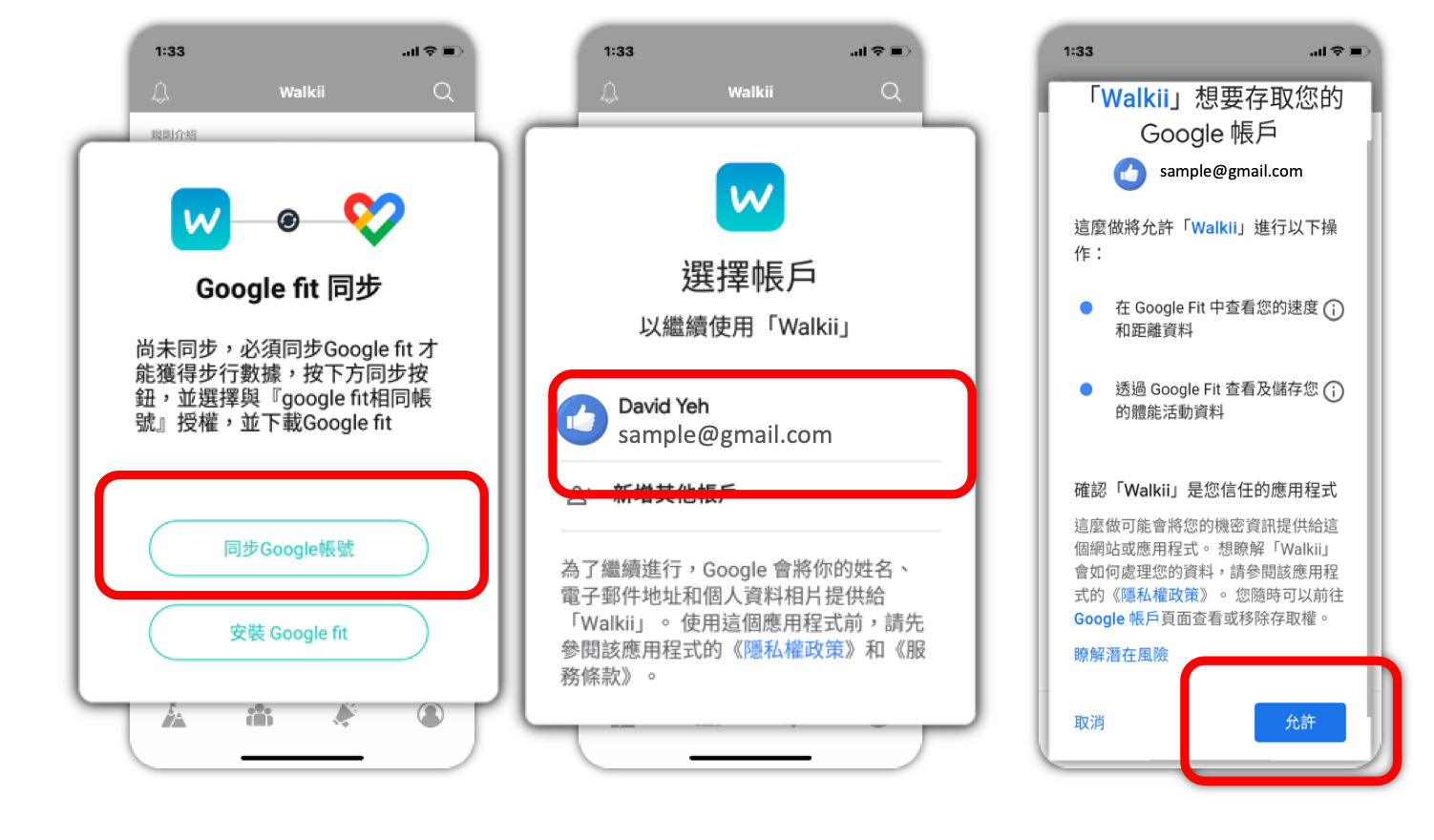
初次登入時同步Google 帳號授權,即可透過Google Fit 取得當日步數(若無Google Fit App需先下載):
同步Google 帳號 → 選擇Google Fit連動的『帳號』→『允許』 - 若不確定是否同步正確,您還可以按以下步驟:
個人資料 → 設定 → 管理已連結應用程式,確認是否有 Walkii
【Android】Sync. Google fit
- Download the Google Fit and connect with your Google account.
- Turn on Auto-Sync.: Open Google fit->Personal Information->Settings->Manage Connected Apps .
<諾和諾德員工參加方式>
<How Novo Nordisk Employees Can Participate>
【STEP 3-1. 加入企業運動圈】
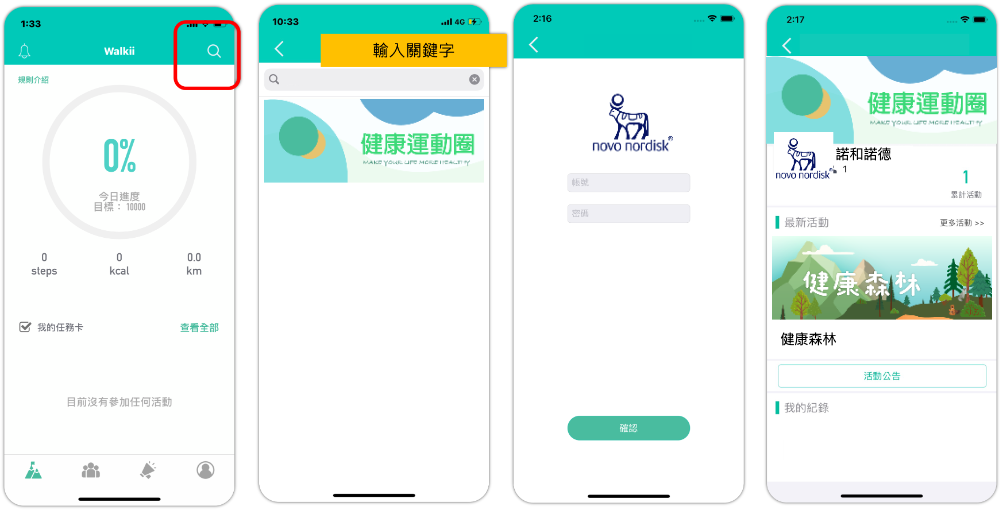
- 點選搜尋(右上角放大鏡),輸入『諾和諾德』,點選加入『諾和諾德 Novo Nordisk』運動圈
-
登入資訊:
帳號:『員工工號』。
密碼:『員工工號』。
【STEP 3-1. Employee Join『 Novo Nordisk Walking Club』】
- Search『Novo Nordisk』and join『諾和諾德 Novo Nordisk』club
-
Log in information:
- Account:Employee ID
- Password:Employee ID
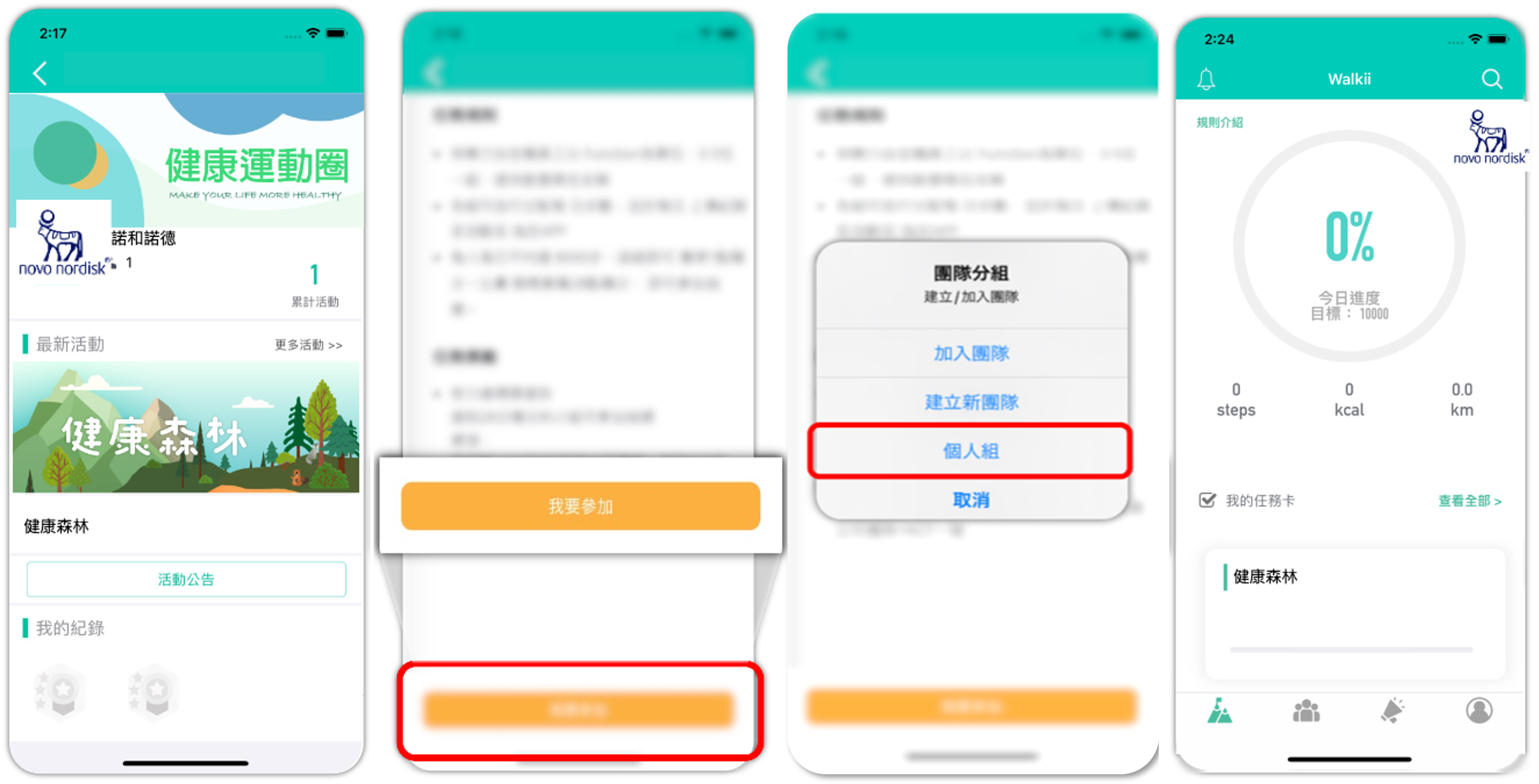
【STEP 3-2. 個人挑戰 取得任務卡】
- 點入任務卡,點選『我要參加』
- 選擇『個人組』
- 確認參加後,可於APP首頁找到任務卡
【STEP 3-2. Participate as an Individual 】
- Go into「Events」page, and click『健康森林 Health Forest 』
- Choose「Individual」
- Open Walkii app and get into the mission『健康森林 Health Forest 』
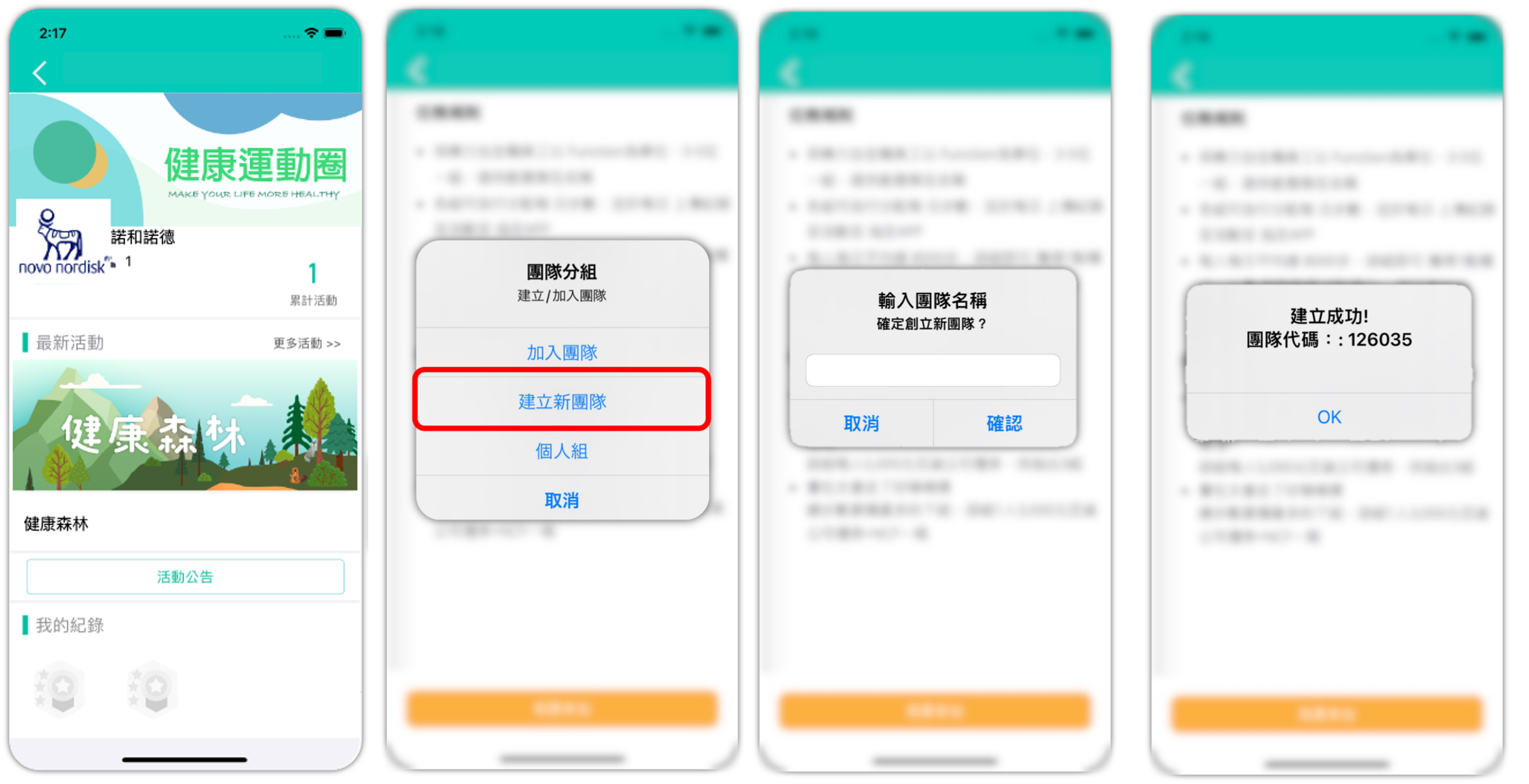
【STEP 3-3. 隊長建立你的團隊 取得任務卡】
- 點入任務卡,點選『我要參加』
- 選擇『建立新團隊』,並輸入『團隊隊名』,即可獲得『團隊代碼』
- 請隊長分享『團隊代碼』邀請隊員加入隊伍
- 一個團隊最多5人
- 確認建立後,可於APP首頁找到任務卡
【STEP 3-3. Team Leader create your team】
- Go into「Events」page, and click『健康森林 Health Forest 』
- Choose「Create a New Team」, and type your「Team Name」
- You will receive a「Team Code」, and share this「Team Code」to other team members.
- The maximum number of people in a team is 5 people
- Open walkii app and get into the mission『健康森林 Health Forest 』
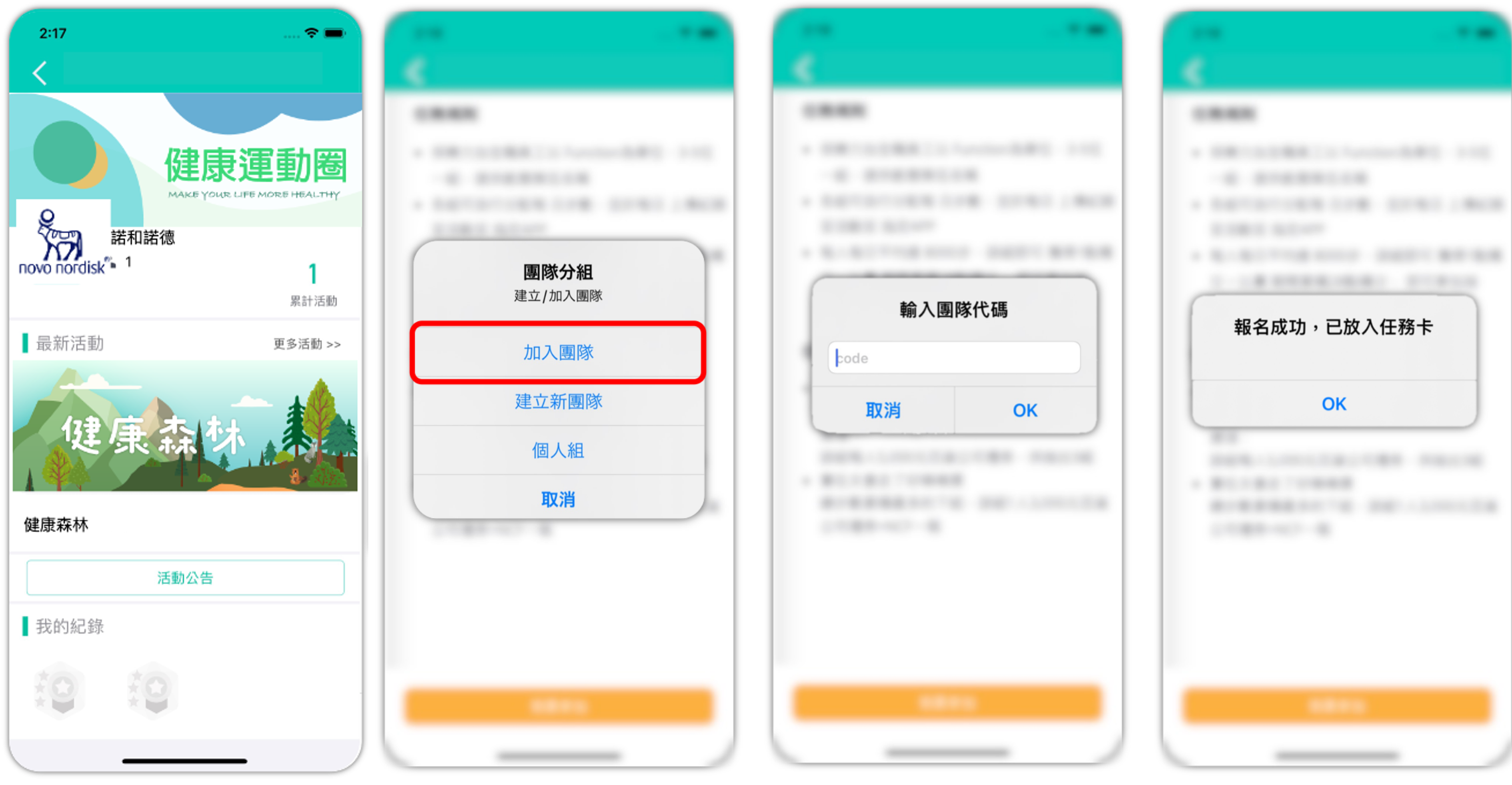
【STEP 3-4. 隊員加入你的團隊 取得任務卡】
- 點入任務卡,點選『我要參加』加入活動
- 選擇『加入團隊』
- 輸入『團隊代碼』即可成功加入隊伍
- 一個團隊最多5人
- 確認參加後,可於APP首頁找到任務卡
【STEP 3-4. Team member join the team】
- Go into「Events」page, and click『健康森林 Health Forest 』
- Choose「Join the Team」
- Type your「Team Code」to join the team.
- The maximum number of people in a team is 5 people
- Open walkii app and get into the mission『健康森林 Health Forest 』
<民眾參加方式>
<How The Public Employees Can Participate>
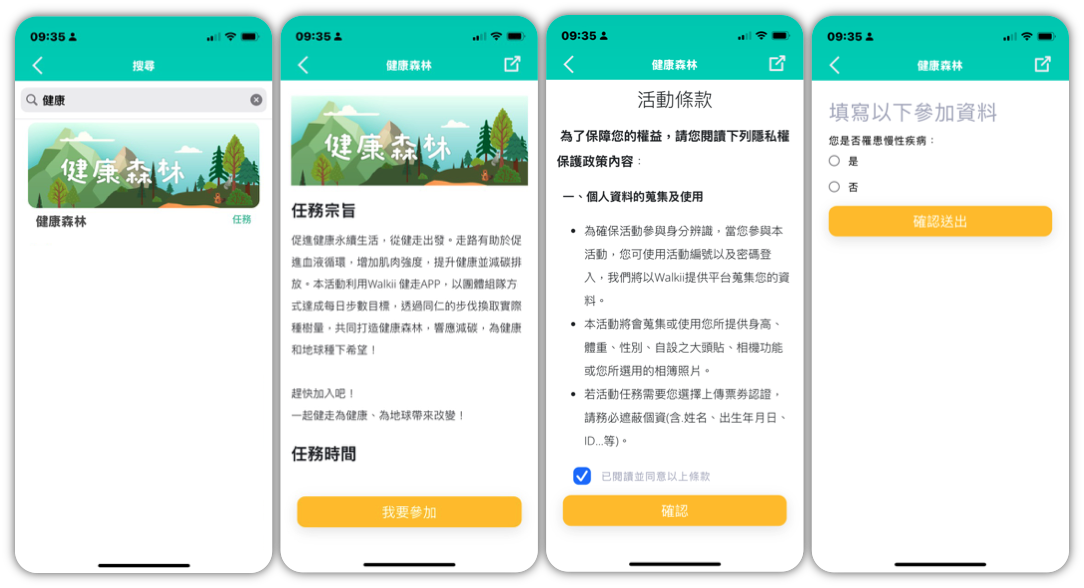
【STEP 3. 加入活動】
- 點選搜尋(右上角放大鏡),輸入『健康森林』,點選加入『健康森林 Health Forest 』活動
【STEP 3: Join the Event】
Tap the search icon (magnifying glass in the top right corner), enter "Health Forest", and select "健康森林 Health Forest" to join the event.
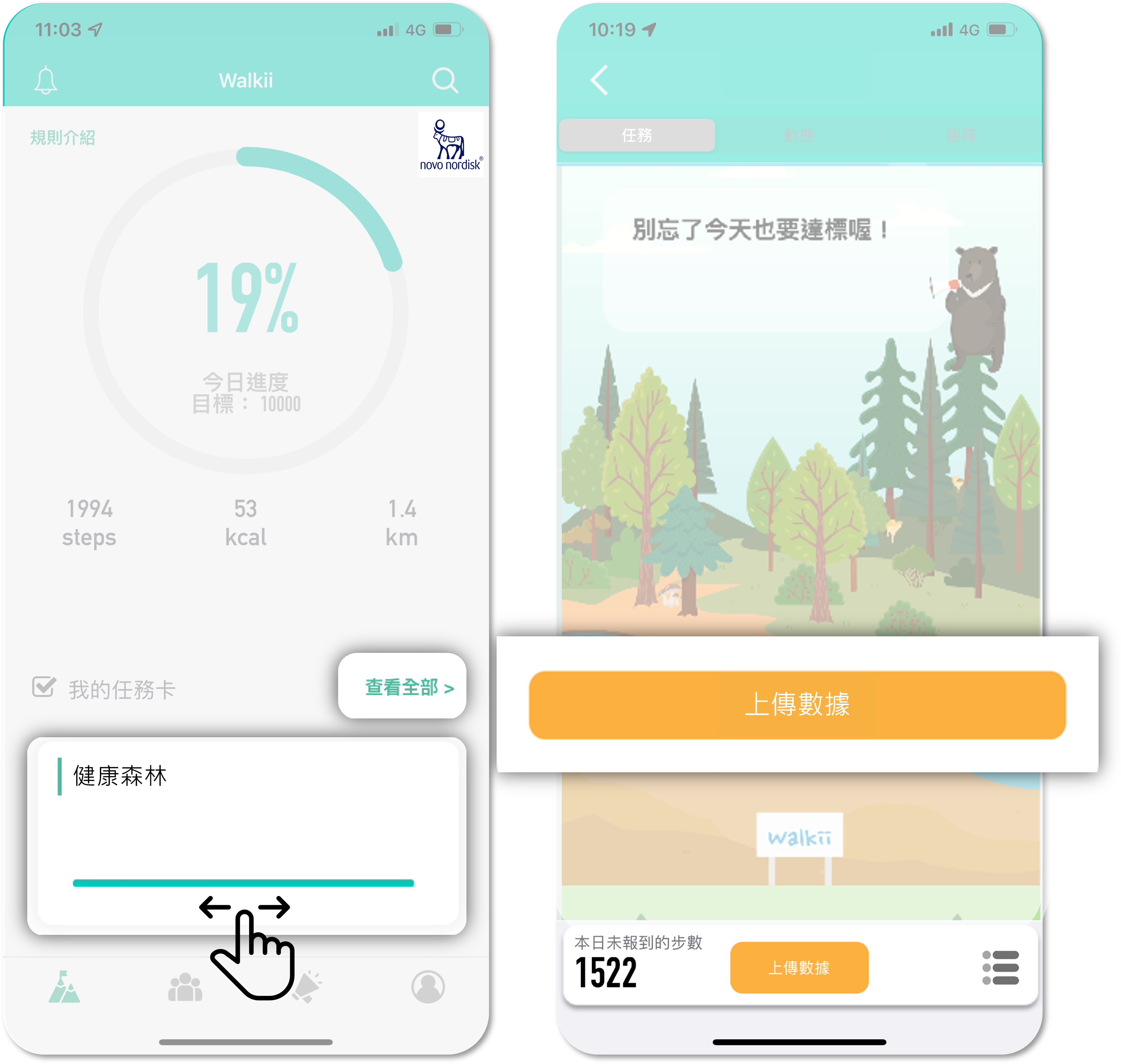
【STEP 4. 上傳數據】
- 回到首頁,點入任務卡『健康森林 Health Forest 』
- 點選『上傳數據』上傳當日數據,若無新的步數則顯示『紀錄都已同步』
-
建議每日睡前打開 app 一次同步當日累積步數
【STEP 4.Synchronize Your Data Everyday】
- Go to the mission of『健康森林 Health Forest 』
- Sync. the data by clicking the『Synchronize Your Walking Steps Record』, yellow icon in the bottom of the screen.
- You should update the data every day before you go to bed.
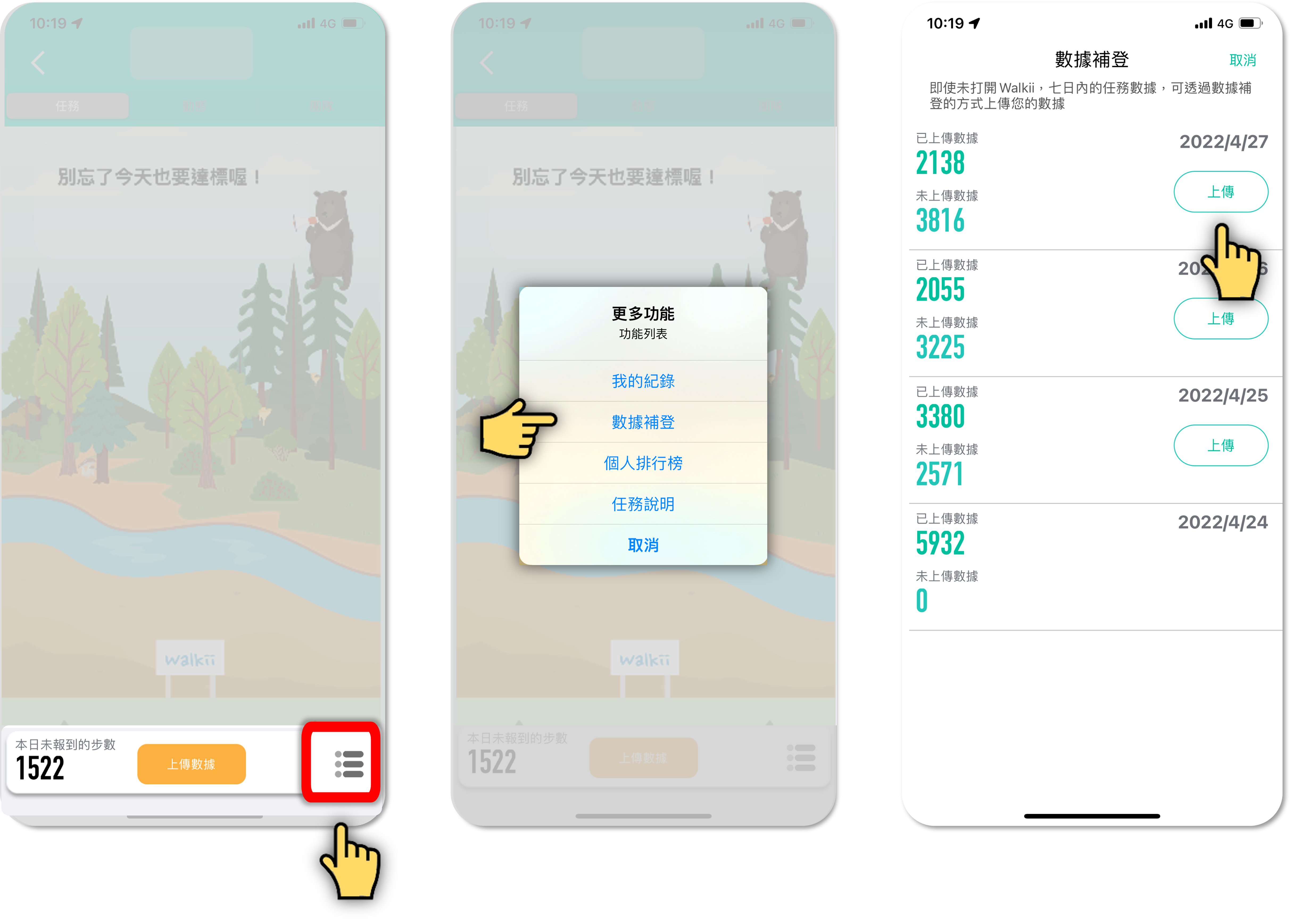
【STEP 5. 步數數據7日內補登】
- 如當日忘記打開 app 同步紀錄,可使用 app 7日內『數據補登』功能手動上傳您的紀錄
- 點入任務卡畫面右下角圖示,點選『數據補登』上傳七日內的步數數據
(如需使用補登功能,需先上傳一筆數據→進入任務卡後,點按「上傳數據」)
【STEP 5.Forget to update daily record, Upload Data within 7 Days】
- If you forget to update the your daily record, you can upload the past 7 days data on the 『Data Registration』page.
- Go to the mission of『健康森林 Health Forest 』
- Clicking the『Data Registration』to update your past 7 days data.
Walkii APP 使用提醒
- 活動期間勿移除APP,以免造成重新載入資料遺失。如需重新安裝或更換手機,請先確認帳號有使用Email 綁定,更換後使用Email 登入APP即可。
- 參加本活動限定使用Walkii APP。
- 活動主辦單位會核對並保留所有修正紀錄的權利,如有異常數據將可不採計,主辦單位可取消活動資格,參加者不得異議。
【 健走任務 】注意事項
- 請開啟Apple Health(IOS)/Google Fit(Android)同步。
- 每日開啟APP點選任務卡內的『上傳數據』按鈕上傳當日數據。 如當日忘記上傳數據,可使用APP內的『數據補登』功能,七日內的紀錄皆可上傳。
- 最後補登日:活動結束後一天;請同仁在這天完成最後七天所有的數據上傳。
- Apple Health(IOS)/Google Fit(Android)內同時具有穿戴裝置與手機紀錄時,將會以紀錄較高的一方作為數據紀錄。
- Android手機用戶如配戴Garmin手錶,請於Walkii Garmin connect 頁面完成帳號同步;另Garmin 數據限當日完成同步,不支援七日補登功能,如需使用補登功能,請同步Google Fit。
NOTE
- Participants are advised not to uninstall the app during the event to avoid data loss. If you need to reinstall or switch devices, please ensure your account is linked to an email and log in with the same email after switching.
- This event is exclusive to the Walkii APP. Please enable Apple Health (iOS) / Google Fit (Android) synchronization.
- Open the app daily and tap the "Upload Data" button in the task card to submit your step count.
- If you forget to upload your data on a given day, you can use the “Data Completion” feature in the app to upload records within seven days.
- Final data completion deadline: The day after the event ends. Please ensure all data from the last seven days is uploaded by then.
- If both a wearable device and phone records exist in Apple Health (iOS) / Google Fit (Android), the higher recorded step count will be used.
-
For Android users with Garmin watches:
- Ensure your account is synced via the Walkii Garmin Connect page.
- Garmin data must be synced on the same day and does not support the seven-day data completion feature. If you need this feature, please sync with Google Fit instead.
- The event organizers reserve the right to review and correct all records. Any abnormal data may be excluded, and participants may be disqualified without appeal.
系統客服
-系統軟體問題-
LINE專人客服協助您處理程式與系統問題
[email protected] 客服時間 週一至週五
Customer Service
- System problems -
[email protected] customer service response Monday to Friday